

What is Moon+ Reader Pro
Moon+ Reader Pro is a premium Android e-book reading application developed by Moon+ that offers advanced customization, wide format support, and extensive library management tools. It improves upon the free version by offering an ad-free, smoother reading experience with features like Text-to-Speech (TTS), detailed reading statistics, and improved PDF handling. It supports many e-book and document formats—including EPUB, PDF, MOBI, CHM, CBZ, CBR, AZW3 among others—along with OPDS catalogs. Readers can adjust nearly every visual aspect: fonts, themes, page transitions, spacing, margins, plus options like night/day modes. Backup, sync, annotations, and password protection are part of what makes this app powerful for dedicated readers. :contentReference[oaicite:0]{index=0}
Pros and Cons
- Pros
- Wide format compatibility: supports EPUB, PDF, MOBI, AZW3, CHM, CBZ, CBR, TXT, HTML and more. :contentReference[oaicite:1]{index=1}
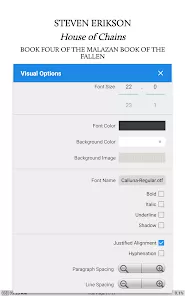
- Highly customizable reading experience: themes (day, night, sepia), custom backgrounds, fonts, margins, spacing, line spacing, hyphenation. :contentReference[oaicite:2]{index=2}
- Text-to-Speech support: allows hands-free listening with adjustable options and voice engines. :contentReference[oaicite:3]{index=3}
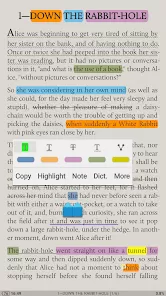
- Strong tools for annotation, highlighting, bookmarks, and notes. Useful for study or research. :contentReference[oaicite:4]{index=4}
- Library management is robust: tags, collections, sorting by title/author/date, OPDS support, bookshelf layouts, cloud sync and backup (Dropbox, Google Drive, WebDAV). :contentReference[oaicite:5]{index=5}
- Ad-free, faster performance in the Pro version. :contentReference[oaicite:6]{index=6}
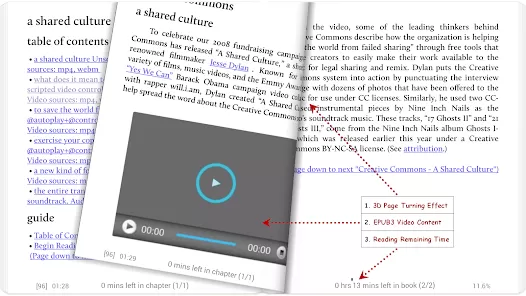
- Special PDF features: form filling, PDF annotations, handwriting; dual-page mode in landscape; smart scroll; text reflow. :contentReference[oaicite:7]{index=7}
- Gesture controls and hardware button integration (volume keys, Bluetooth/headset keys) offer flexibility. :contentReference[oaicite:8]{index=8}
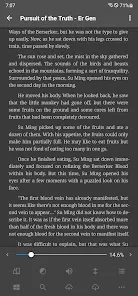
- Eye-care features: blue light filter, night mode, adjustable brightness, themes to reduce eye strain. :contentReference[oaicite:9]{index=9}
- Security and privacy options like password or PIN protection for starting the app or locking library. :contentReference[oaicite:10]{index=10}
- Cons
- Costs money: Pro version is a paid upgrade; free version has ads and limited feature set. :contentReference[oaicite:11]{index=11}
- Complexity: so many settings and customization options can overwhelm new users. :contentReference[oaicite:12]{index=12}
- PDF handling not always perfect: large layout PDFs or image-rich documents may lag or have formatting inconsistencies. :contentReference[oaicite:13]{index=13}
- Some features depend on external services or engines (like TTS, dictionary, cloud services)—users must configure or install these. :contentReference[oaicite:14]{index=14}
- Learning curve for power-user functionalities: gestures, OPDS catalogs, custom themes may require reading documentation or experimenting. :contentReference[oaicite:15]{index=15}
- Battery usage and performance may vary on lower-end devices, especially with animations, large PDFs, or with dual-page and continuous scroll modes. (Inferred)
- Overwhelming number of layout and appearance options may lead to inconsistent user experience across different books. (Inferred)
- No official iOS version; it’s Android-only. (Moon+ Reader Pro is only for Android) :contentReference[oaicite:16]{index=16}
- Syncing across devices depends on proper cloud setup; failures in cloud services can lead to lost progress/annotations. :contentReference[oaicite:17]{index=17}
- Some users reported bugs in PDF continuous scroll or resetting to first page when fast scrolling. :contentReference[oaicite:18]{index=18}
Key Features
- Supports myriad file formats: EPUB, PDF, MOBI, AZW3, CHM, TXT, HTML, CBZ/CBR, FB2, DOCX, ODT, RTF, UMD, Markdown, and compressed formats (ZIP, RAR). :contentReference[oaicite:19]{index=19}
- Multiple reading display modes: paged flip, continuous scroll, single page, dual-page in landscape, text reflow for better readability. :contentReference[oaicite:20]{index=20}
- Customizable visual and typography options: font selection or import, font size, style, line spacing, margins, justification, hyphenation. :contentReference[oaicite:21]{index=21}
- Theming: day/night/sepia modes, background images or patterns, more themes in Pro version, color filters, blue light filters. :contentReference[oaicite:22]{index=22}
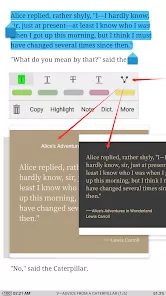
- Annotations and bookmarks: highlighting with several colors, notes, pens or handwriting in PDFs, bookmarks, sharing of annotations. :contentReference[oaicite:23]{index=23}
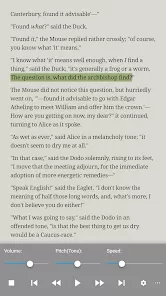
- Text-to-Speech (TTS), voice settings, and headset/Bluetooth key support. :contentReference[oaicite:24]{index=24}
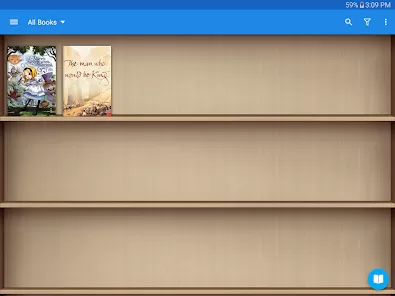
- Library organization tools: tags, collections, custom shelves (favorites, downloads, authors), sorting and filtering, OPDS catalog support. :contentReference[oaicite:25]{index=25}
- Cloud backup & synchronization of reading position, annotations, bookmarks via Dropbox, Google Drive, WebDAV. :contentReference[oaicite:26]{index=26}
- Security and privacy options: password or PIN protection at startup or for books. :contentReference[oaicite:27]{index=27}
- Widgets and shortcuts: widget “shelf” for favorite books, book-to-homescreen shortcuts; customizable reader bar. :contentReference[oaicite:28]{index=28}
Functions (What the App Lets You Do)
- Import or add books from local storage, cloud services, or OPDS catalogs. :contentReference[oaicite:29]{index=29}
- Browse your library with filters and tags; sort by author/title/date; mark favorites. :contentReference[oaicite:30]{index=30}
- Open books in your preferred format and read using your chosen layout (paged, scroll, dual-page, text reflow). :contentReference[oaicite:31]{index=31}
- Customize appearance: change font, themes, background, adjust brightness, apply blue light filter. :contentReference[oaicite:32]{index=32}
- Highlight text, add notes/bookmarks, share or export annotations. :contentReference[oaicite:33]{index=33}
- Use TTS to have text read aloud; control via Bluetooth/headset buttons. :contentReference[oaicite:34]{index=34}
- Sync progress and backups across devices and storage options. :contentReference[oaicite:35]{index=35}
- Set security locks to protect content or the entire application. :contentReference[oaicite:36]{index=36}
- Create home screen shortcuts or widgets for quick access to favorite books. :contentReference[oaicite:37]{index=37}
- Configure gestures and hardware key controls for page turning, menu access, or other reading functions. :contentReference[oaicite:38]{index=38}
How to Use (Step-by-Step)
- 1. Install the app: Purchase and install Moon+ Reader Pro from Google Play Store to get the full feature set and ad-free experience. :contentReference[oaicite:39]{index=39}
- 2. Import your books: Copy e-book files (EPUB, PDF, MOBI etc.) into your device storage or connect your cloud service (Dropbox, Google Drive, WebDAV). Use “Scan” or “Add files” in the library. :contentReference[oaicite:40]{index=40}
- 3. Organize library: Use tags, collections, favorites, bookshelves. Sort by title, author, or date added for easier navigation. :contentReference[oaicite:41]{index=41}
- 4. Choose appearance settings: Pick a theme (day/night/sepia), set font type and size, adjust margins, spacing, line spacing, apply blue light filter or background image. :contentReference[oaicite:42]{index=42}
- 5. Pick reading mode: Decide between paged flip, continuous scroll, dual-page (landscape), or text reflow (especially useful for PDF). :contentReference[oaicite:43]{index=43}
- 6. Use annotation & bookmarks: Highlight passages, add notes or handwriting (for supported files), bookmark pages; export or share these if needed. :contentReference[oaicite:44]{index=44}
- 7. Use Text-to-Speech or audio features: Activate TTS, adjust speed/pitch, use Bluetooth or headset controls to play/pause. :contentReference[oaicite:45]{index=45}
- 8. Backup & sync: Enable cloud sync for reading position, bookmarks, annotations so your reading can continue on other devices. Use services like Dropbox, Google Drive, or WebDAV. :contentReference[oaicite:46]{index=46}
- 9. Secure your reading content: Set password or PIN for app startup if desired; restrict access to private books. :contentReference[oaicite:47]{index=47}
- 10. Customize controls: Assign gestures, volume key actions, hardware buttons; configure page turn by swipe, tap, or via physical keys. :contentReference[oaicite:48]{index=48}
- 11. Use widgets or home-screen shortcuts: Pin favorite books or shelves to your home screen; use widget shelf inside the app for quick access. :contentReference[oaicite:49]{index=49}
- 12. Adjust for night reading: Enable night theme or blue-light filter, reduce brightness, maybe use warm tone background to protect eyes. :contentReference[oaicite:50]{index=50}



 0
0