
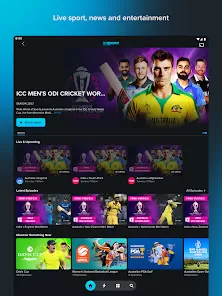
9Now is a free video streaming service offered by Nine Entertainment, one of the largest media companies in Australia. The platform provides users with on-demand access to a wide array of content, including TV shows, movies, sports, news, and live broadcasts. With 9Now, users can stream shows from Nine’s channels, including Channel Nine, 9Gem, 9Life, and 9Go!, as well as exclusive programs and popular international content. The platform is available on a range of devices, including smartphones, tablets, smart TVs, and desktops. Additionally, it offers live streaming of major events like news, sports broadcasts, and reality shows, making it a go-to service for Australians looking to stay updated or entertained. Users can also catch up on episodes of popular shows that they may have missed. 9Now's accessibility, ease of use, and broad content variety make it a popular choice for those looking for free, high-quality streaming in Australia.
Pros and Cons of 9Now
Pros:
Free Service: 9Now is completely free to use, offering a vast library of content without requiring any subscription or payment.
Live Streaming: Users can watch live broadcasts of major events, sports matches, and TV shows as they air.
High-Quality Content: 9Now provides content in high-definition quality, ensuring a great viewing experience.
Catch-Up TV: It offers catch-up TV functionality, allowing users to watch episodes they missed from the Nine Network’s channels.
Wide Device Compatibility: 9Now is available on various platforms including iOS, Android, smart TVs, and web browsers, making it accessible on most devices.
Cons:
Geographical Restrictions: 9Now is only available to users in Australia. International users are unable to access its content due to licensing restrictions.
Ads: While 9Now is free, it is ad-supported. Viewers must watch ads before or during content, which can be inconvenient for some.
Limited Content Library: Although it offers a wide range of content, 9Now's library is not as vast as some other streaming services like Netflix or Stan, especially for international shows and movies.
Device-Specific Issues: Some users report compatibility issues with specific devices, especially older smart TVs or unsupported platforms.
Account Requirement: While you can watch many programs without an account, creating an account is necessary to access certain features like personalizing recommendations or saving your favorite shows.
Key Features of 9Now
Free Streaming: 9Now is entirely free to use with no subscription fee, making it a cost-effective way to watch live and on-demand content.
Live TV and Sports: It provides live streaming of major TV shows, events, sports matches, and breaking news, so you never miss out on important events.
Catch-Up TV: Users can catch up on missed episodes from the Nine Network’s channels, including programs like "The Voice", "The Block", and "Married at First Sight".
Device Compatibility: 9Now works on a variety of devices, such as smartphones, tablets, smart TVs, desktop computers, and gaming consoles, making it versatile and easy to access from anywhere.
User Account: By creating an account, users can save their favorite shows, get personalized recommendations, and access exclusive content based on their viewing preferences.
High-Definition Video: The platform provides content in high-definition, ensuring sharp and clear visuals for an enhanced viewing experience.
Parental Controls: 9Now allows users to set parental controls to restrict access to certain content, making it a family-friendly platform.
Functions of 9Now
On-Demand Content: Access a broad selection of TV shows, movies, and exclusive content on-demand at any time.
Live Streaming: Stream live broadcasts of popular programs, sports events, news updates, and reality shows directly from the Nine Network’s channels.
Catch-Up TV: Rewind to previously aired episodes and watch them at your convenience, even if you missed the original broadcast.
Account Features: Create a free account to save your watch history, customize your preferences, and get recommendations tailored to your tastes.
Personalized Recommendations: The app uses your viewing habits to suggest shows and movies that align with your interests, making it easier to discover new content.
Cross-Device Sync: Watch on one device and continue watching on another with cross-device syncing. Whether you're on your smartphone or smart TV, your content stays with you.
Search and Filter: Easily find specific programs, episodes, or movies using the search and filter options, making it simple to navigate the platform.
How to Use 9Now
Click the button "Check All Versions" below to download and install it.
Step 1 – Download the App: Go to the App Store (iOS) or Google Play Store (Android) and download the 9Now app on your smartphone or tablet. Alternatively, visit the 9Now website on a desktop browser.
Step 2 – Create an Account: While you can watch content without an account, signing up provides benefits like saving your favorite shows and getting personalized recommendations. To sign up, simply enter your details (email and password).
Step 3 – Browse Content: Use the app's navigation features to explore the available content. You can view live TV, browse through on-demand categories, or check out trending programs.
Step 4 – Start Streaming: Once you’ve found something you like, simply click on the title to start streaming. If you want to watch later, you can add it to your watchlist.
Step 5 – Use Filters: Apply filters to narrow down your search. Whether you’re looking for dramas, reality shows, or documentaries, filters help you find exactly what you’re after.
Step 6 – Enjoy Live TV: To watch live content, go to the "Live TV" section and select a show or event that’s currently airing. Enjoy sports, news, or entertainment in real time.
Step 7 – Use Parental Controls: If you're watching with children, make sure to set up parental controls to restrict access to inappropriate content.








 0
0