
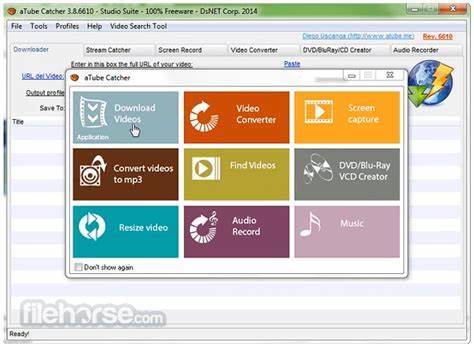
aTube Catcher is a versatile Windows application designed for downloading, converting, and managing video and audio content from online platforms. It supports popular websites like YouTube, Vimeo, Dailymotion, and many others, allowing users to save videos in various formats such as MP4, AVI, FLV, and WMV. In addition to downloading, aTube Catcher includes tools for screen recording, audio extraction, and video conversion, making it a comprehensive multimedia solution. Its user-friendly interface and high-speed downloading capabilities make it a popular choice for casual users and content creators who want to store and convert media efficiently, without relying on multiple separate programs.
Pros and Cons
Pros
- Download videos from a wide variety of online platforms.
- Convert videos to multiple formats for different devices.
- Screen recording and audio extraction features included.
- High-speed downloading and conversion capabilities.
- User-friendly interface suitable for beginners and advanced users.
- Free to use with optional settings for advanced customization.
- Supports batch downloads for multiple videos simultaneously.
Cons
- Windows-only software; no native support for Mac or Linux.
- May include bundled offers during installation if not opted out.
- Occasional website compatibility issues when downloading from less common sites.
- Advanced features may require some learning for optimal use.
- Limited support for DRM-protected content.
Key Features
- Download videos from YouTube, Vimeo, Dailymotion, and other platforms.
- Convert downloaded videos to MP4, AVI, FLV, WMV, and more.
- Screen recording for capturing desktop activity and video streams.
- Audio extraction to save music or sound from videos.
- Batch downloading and conversion for multiple files at once.
- Support for custom resolution, bitrate, and format settings.
- User-friendly interface with intuitive navigation.
- High-speed downloading with progress monitoring and pause/resume options.
Functions
- Download videos from supported online platforms to local storage.
- Convert videos into different formats for playback on various devices.
- Record screen activity for tutorials, presentations, or streaming content.
- Extract audio from videos and save as MP3 or other audio formats.
- Manage multiple downloads simultaneously with batch processing.
- Adjust resolution, quality, and format settings to meet personal preferences.
- Monitor download and conversion progress in real-time.
- Store and organize downloaded media efficiently on your device.
How to Use
- Download and install aTube Catcher from the official website.
- Open the application and select the desired function (Download, Convert, Record, or Extract Audio).
- For video downloads, copy the URL of the video and paste it into the download field.
- Select the desired format, resolution, and save location for the video.
- Click “Download” to start the process and monitor progress in the interface.
- Use the conversion tool to change video files into the desired format as needed.
- Record your screen or extract audio by selecting the appropriate option and configuring settings.
- Save the resulting files in your preferred folder for easy access.
- Repeat the process for additional videos or audio files.
- Regularly check for software updates to ensure compatibility with online platforms and improved performance.


 0
0 