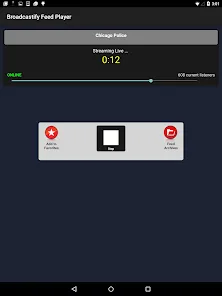
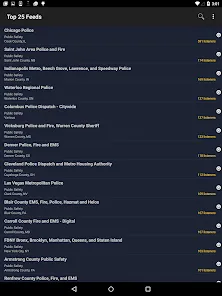
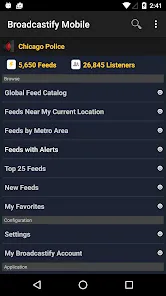
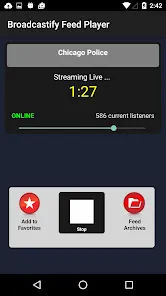
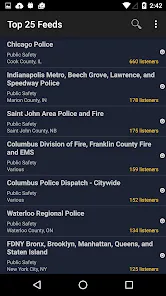
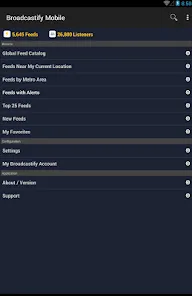









Broadcastify Police Scanner is a mobile and online platform that offers live access to public safety radio communication streams. Through its network, users can listen to feeds from police, fire, EMS, aviation, rail, marine, and amateur radio sources from around the world. The service aggregates scanner audio contributed by volunteer broadcasters and agencies, offering wide geographic coverage and variety of dispatch channels. It also provides access to archived audio (for premium users) and metadata such as listener counts and recent feed activity. Because it is Internet‑based, it eliminates the need for physical scanner hardware while enabling remote monitoring via smartphone or web browser.
Pros & Cons
Pros:
Extensive coverage: access to thousands of feeds globally across many public safety and transport categories. :contentReference[oaicite:0]{index=0}
Convenience: no requirement for traditional radio scanner hardware; use via app or browser. :contentReference[oaicite:1]{index=1}
Archive access (premium): users can replay past broadcasts for up to 180 days. :contentReference[oaicite:2]{index=2}
Favorites and alerts: mark preferred feeds, and receive push notifications for major incidents or when listener counts spike. :contentReference[oaicite:3]{index=3}
User statistics and metadata: see how many people are listening to each feed in real time. :contentReference[oaicite:4]{index=4}
Ad‑free premium experience: paid tier removes ads and unlocks more features. :contentReference[oaicite:5]{index=5}
Search and location tools: ability to find feeds by location or name, and see nearby scanner feeds. :contentReference[oaicite:6]{index=6}
Cons:
Dependence on volunteer broadcasters: if the feed source goes offline, the stream stops. :contentReference[oaicite:7]{index=7}
Variable stability: connections may drop, lag, or fail due to network or server issues. :contentReference[oaicite:8]{index=8}
Region limitations: some feeds or features may not be available in certain countries due to regulation or lack of broadcasters. :contentReference[oaicite:9]{index=9}
Legal restrictions: in some jurisdictions, listening to or rebroadcasting scanner audio may be regulated or illegal. :contentReference[oaicite:10]{index=10}
App limitations or removal: the official broadcastify app for iOS has been removed or restricted, prompting reliance on third‑party wrappers. :contentReference[oaicite:11]{index=11}
Security or privacy concerns: some versions may have moderate security issues such as weak crypto or exposed manifest. :contentReference[oaicite:12]{index=12}
Potential ad annoyance: the free version includes ads which may interfere with listening. :contentReference[oaicite:13]{index=13}
Key Features
Large global feed network — thousands of scanner streams spanning police, fire/EMS, aviation, rail, marine, and amateur radio. :contentReference[oaicite:14]{index=14}
Archive replay (up to 180 days) for premium users — catch up on past incidents. :contentReference[oaicite:15]{index=15}
Favorites and bookmarking — save frequent feeds for quick access. :contentReference[oaicite:16]{index=16}
Push notifications and alerts — receive alerts when listener count spikes or major events occur on a feed. :contentReference[oaicite:17]{index=17}
Search by location or name — find feeds near you or in a region of interest. :contentReference[oaicite:18]{index=18}
Real‑time listener statistics — view how many users are currently tuned into each feed. :contentReference[oaicite:19]{index=19}
Automatic reconnect — if a feed connection drops, the app attempts to restore the stream. :contentReference[oaicite:20]{index=20}
No ads (premium) — ad suppression for paid users for cleaner listening. :contentReference[oaicite:21]{index=21}
Lightweight and portable client — mobile apps or browser interface that works across devices. :contentReference[oaicite:22]{index=22}
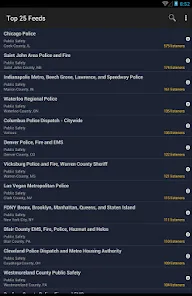
Feed filtering & sorting — list feeds by popularity, newness, or proximity. :contentReference[oaicite:23]{index=23}
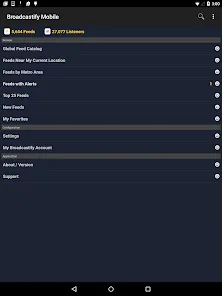
Archive browsing / listings — sections highlighting new feeds, alerts, or top feeds. :contentReference[oaicite:24]{index=24}
Functions
Tune live scanner streams — listen live to public safety or transport radio communications. :contentReference[oaicite:25]{index=25}
Switch between feeds — jump from one feed to another easily, without needing separate hardware. :contentReference[oaicite:26]{index=26}
Manage favorites — add or remove feeds in your favorite list for quick selection. :contentReference[oaicite:27]{index=27}
Receive alerts — get push notifications for high‑activity or critical events on a feed. :contentReference[oaicite:28]{index=28}
Playback archived audio — listen to recordings of previous broadcasts (for eligible feeds). :contentReference[oaicite:29]{index=29}
Search & filter feeds — locate feeds by geography, name, category, or listener count. :contentReference[oaicite:30]{index=30}
Auto reconnect & resume — restore a disrupted connection automatically. :contentReference[oaicite:31]{index=31}
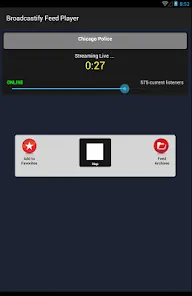
Display listener metadata — each feed shows number of listeners, feed status (online/offline), and other stats. :contentReference[oaicite:32]{index=32}
Support background playback — audio continues while the app is backgrounded (platform permitting). :contentReference[oaicite:33]{index=33}
Notification settings & preferences — control alert thresholds or disable notifications for certain feeds. :contentReference[oaicite:34]{index=34}
Content listing & discovery — browse new feeds, trending feeds, or feeds by category. :contentReference[oaicite:35]{index=35}
How to Use
Install or Access Platform
Click the button “Check All Versions” below to download and install it.
Browse Feeds
Search by location or keyword to locate feeds in your area of interest. :contentReference[oaicite:38]{index=38}
Filter or sort feeds by popularity, category (police, fire, aviation, etc.), or newness. :contentReference[oaicite:39]{index=39}
Check metadata: listener count, feed status (online/offline), and feed description. :contentReference[oaicite:40]{index=40}
Start Listening
Tap a feed entry to begin streaming. Audio should start almost immediately. :contentReference[oaicite:41]{index=41}
If connection fails, allow the app to auto reconnect or manually retry. :contentReference[oaicite:42]{index=42}
Use app controls to pause, stop, or switch feeds as needed.
Manage Favorites & Alerts
Tap a “star” or “heart” icon to add a feed to your favorites list. :contentReference[oaicite:43]{index=43}
Enable push or in‑app notifications to get alerts when listener counts spike or a major event is happening on that feed. :contentReference[oaicite:44]{index=44}
In settings, adjust alert thresholds, enable or disable notifications for particular feeds, or manage sound settings.
Access Archives (if eligible)
Navigate to the archive section in the app (for premium or feed‑eligible ones). :contentReference[oaicite:45]{index=45}
Select a date/time or feed from past days (up to 180 days) and play back the recorded audio. :contentReference[oaicite:46]{index=46}
Adjust Settings & Preferences
Open settings to change audio quality, reconnect behavior, or enable background playback.
Manage notification preferences (which feeds alert, thresholds).
Remove or reorder favorites as needed.
Troubleshoot & Maintain
Check network connection if streams fail — stable internet is required.
If a feed goes offline, try another nearby feed or wait for broadcaster to resume. :contentReference[oaicite:47]{index=47}
Ensure app is up to date to reduce bugs or compatibility issues.
For iOS users, if the official app is restricted or removed, use third‑party apps that support Broadcastify feeds as a wrapper. :contentReference[oaicite:48]{index=48}
Legal Awareness
Check local laws: in some jurisdictions listening or rebroadcasting scanner traffic may be regulated or illegal. :contentReference[oaicite:49]{index=49}
Use the app responsibly, do not share confidential or sensitive content in violation of policies or law.


 0
0