
The BURGER KING® app is a mobile application designed to enhance the customer experience by offering an easy, convenient, and personalized way to order food, access promotions, and earn rewards at BURGER KING® restaurants. Available for both iOS and Android devices, the app allows users to explore the menu, customize their orders, and select nearby restaurants for pickup or delivery. One of its key features is the ability to place mobile orders, which can be picked up in-store or through the drive-thru, ensuring a quicker and smoother experience. Additionally, the app offers exclusive deals, discounts, and loyalty rewards, making it an ideal choice for frequent BURGER KING® customers. It also supports location-based services, enabling users to find nearby restaurants and receive special offers based on their location. Through these capabilities, the BURGER KING® app provides a modern and efficient way for customers to enjoy their favorite meals while taking advantage of exclusive offers and rewards.
Pros and Cons
Pros:
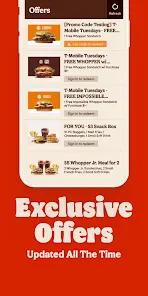
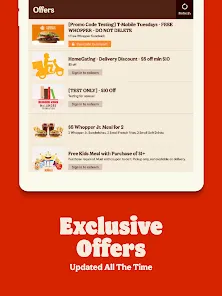
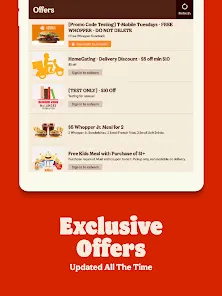
Exclusive Discounts and Offers: Users can access exclusive deals and limited-time offers that are only available through the app, helping to save money on their orders.
Loyalty Rewards: The app allows users to earn points for every purchase, which can be redeemed for free menu items, making it an attractive option for loyal customers.
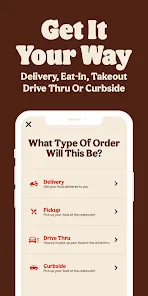
Convenient Ordering: The app allows for mobile ordering, letting users skip the line and place an order in advance for pickup or drive-thru, saving time in busy locations.
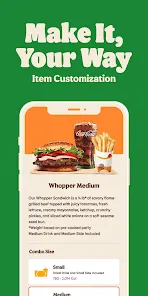
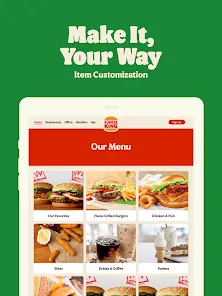
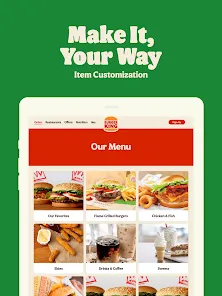
Customization: Users can easily customize their orders directly through the app, allowing them to choose specific ingredients and make modifications to their meal preferences.
Location-Based Offers: The app uses location tracking to send personalized offers based on the user’s proximity to nearby BURGER KING® restaurants, making it easier to find great deals.
Easy Payment Options: The app supports multiple payment methods, including credit/debit cards and mobile wallets, providing a hassle-free and secure way to pay for orders.
Order History and Repeat Orders: The app keeps a record of previous orders, allowing users to quickly reorder their favorite meals with just a few taps.
Cons:
Limited Availability: The app is only available in certain regions, which means that customers outside these areas may not be able to fully take advantage of the app’s features.
Occasional App Glitches: Some users report that the app may experience occasional glitches, such as crashes, slow loading times, or issues with processing orders, which can affect the overall experience.
Not All Menu Items Available: Not every item on the BURGER KING® menu is available for customization or ordering through the app, potentially limiting options for some customers.
Delivery Limitations: While the app supports delivery in certain areas, it may not be available in all regions, limiting users who prefer home delivery over pickup.
Dependence on Internet Connection: As with most mobile apps, a stable internet connection is required to use the app efficiently, which may be an issue in areas with poor connectivity.
Key Features
Mobile Ordering: Users can place orders in advance for pickup or drive-thru, saving time by avoiding long lines and waiting periods.
Loyalty Program: The app offers a rewards program where users earn points with every purchase. These points can be redeemed for free food items and exclusive offers.
Exclusive Deals: Access special offers and promotions that are only available through the app, such as discounts on specific items or entire meals.
Order Customization: Users can customize their orders, including ingredient changes, special requests, and dietary preferences, directly within the app.
Location-Based Promotions: The app uses geolocation to send personalized offers based on the user's proximity to a BURGER KING® restaurant, helping users take advantage of location-specific deals.
Payment Integration: The app supports a variety of payment methods, such as credit/debit cards, Apple Pay, and Google Pay, providing secure and quick transactions.
Easy Reordering: The app remembers your previous orders and allows you to reorder your favorite meals with a single tap, making the ordering process even quicker.
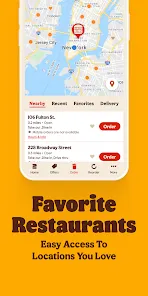
Restaurant Locator: The app includes a restaurant locator feature that helps users find the nearest BURGER KING® locations, whether for dine-in, drive-thru, or pickup.
Functions
Mobile Ordering: The primary function of the BURGER KING® app is to facilitate mobile ordering, enabling customers to skip the line and place their orders ahead of time.
Loyalty and Rewards: As customers make purchases, they accumulate points, which can be redeemed for free food items, discounts, and other rewards.
Customizing Orders: Users can modify their orders according to their preferences, such as adding or removing toppings, switching sides, or adjusting portion sizes.
Exclusive Promotions and Discounts: The app sends out promotions and discounts for a limited time, allowing users to get special deals on their meals.
Order History: The app keeps track of previous orders, enabling users to reorder items they’ve enjoyed in the past with minimal effort.
Find Nearest Restaurant: The app’s restaurant locator feature helps users find nearby BURGER KING® locations, whether for delivery, pickup, or dine-in.
Easy Payment: With integrated payment methods, users can pay for their orders directly within the app, using secure and convenient methods like credit cards or mobile wallets.
How to Use the BURGER KING® App
Step 1: Download the App: Download the BURGER KING® app from the Apple App Store or Google Play Store, depending on your device.
Step 2: Sign Up or Log In: Create a new account or log into your existing BURGER KING® account. You may need to provide basic information like your name, email, and payment details.
Step 3: Explore the Menu: Browse the menu to view BURGER KING®'s offerings, including burgers, sides, drinks, and desserts. You can also customize your order by selecting ingredients and meal preferences.
Step 4: Choose a Location: Use the app’s location feature to find the nearest BURGER KING® restaurant or select one for pickup or delivery.
Step 5: Place Your Order: After customizing your meal, proceed to checkout and review your order. You can choose between pickup, drive-thru, or delivery, depending on the options available at the selected restaurant.
Step 6: Pay for Your Order: Select your payment method and securely pay for your order through the app. You can use a credit card, debit card, or mobile wallet.
Step 7: Pick Up or Get Your Delivery: If you chose pickup, head to the restaurant and skip the line. If you selected delivery, your food will be brought to your location.
Step 8: Earn Rewards: With every order, earn points that can be redeemed for free food or other rewards through the app’s loyalty program.


 0
0