The Dexcom G6 is a continuous glucose monitoring (CGM) system designed to help individuals with diabetes monitor their glucose levels in real-time. Unlike traditional blood glucose meters that require fingersticks, the G6 uses a small sensor placed under the skin to measure glucose levels continuously throughout the day and night. It provides users with immediate alerts if their glucose levels are too high or low, offering better control over blood sugar levels. The Dexcom G6 is particularly beneficial for people with type 1 and type 2 diabetes, allowing them to make timely adjustments to their insulin doses, diet, or activity levels. This system is highly regarded for its accuracy, ease of use, and integration with smartphones and insulin pumps.
Pros and Cons
Pros:
Continuous Monitoring: The Dexcom G6 provides real-time glucose readings, eliminating the need for frequent fingerstick tests and offering constant monitoring throughout the day and night.
Accurate Results: Known for its high accuracy, the Dexcom G6 provides precise readings that help users make informed decisions regarding their diabetes management.
Alerts and Notifications: Users receive immediate notifications if their glucose levels are too high or low, allowing them to take timely action to prevent complications.
No Fingersticks: The Dexcom G6 eliminates the need for painful fingerstick tests, as the sensor continuously tracks glucose levels, making diabetes management less invasive.
Smartphone Integration: The system pairs with smartphones, allowing users to track their glucose levels on the go using the Dexcom G6 app, providing convenience and accessibility.
Easy to Use: The sensor is easy to apply and wear, making it a user-friendly solution for diabetes management, especially for those who may struggle with traditional methods.
Cons:
Cost: The Dexcom G6 system can be expensive, especially when considering the recurring costs of sensors and transmitters. Insurance coverage may vary, and out-of-pocket costs can be high for some users.
Sensor Lifespan: The sensor typically lasts for 10 days, meaning users will need to replace it regularly. While this is standard for CGM devices, the recurring costs can add up.
Sensor Accuracy Issues: Some users report occasional issues with sensor accuracy, such as the system displaying false highs or lows, although these instances are relatively rare.
Size of Sensor: While smaller than some alternatives, the Dexcom G6 sensor may still feel bulky or uncomfortable for certain users, particularly those with a smaller frame.
Requires Calibration: While the Dexcom G6 is designed to require minimal calibration, users may still need to calibrate the device from time to time, particularly in certain situations.
Key Features
Continuous Glucose Monitoring: Provides 24/7 monitoring of glucose levels, offering immediate updates and data for more precise diabetes management.
Smartphone Integration: The Dexcom G6 pairs with both Android and iOS devices, allowing users to track their glucose levels via a dedicated mobile app.
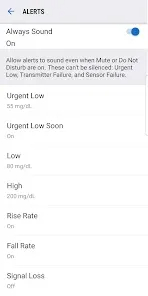
Customizable Alerts: Users can set personalized high and low glucose level alerts to help prevent dangerous blood sugar fluctuations.
No Fingersticks Required: The system uses a sensor to provide continuous glucose readings, reducing the need for traditional fingerstick tests.
10-Day Sensor Life: The sensor lasts for 10 days before needing replacement, providing long-term convenience without frequent changes.
Integration with Insulin Pumps: The Dexcom G6 can be integrated with insulin pumps for automated insulin delivery based on real-time glucose data, improving diabetes management.
Real-Time Data Sharing: Users can share their glucose data with caregivers, doctors, or family members, promoting better collaboration in managing diabetes.
Functions
Real-Time Glucose Monitoring: The system constantly tracks glucose levels, offering insights into trends, highs, and lows to better manage diabetes.
Customizable Alerts: Users can receive notifications if their glucose levels cross preset thresholds, helping them respond to changes more quickly.
Data Analysis: Dexcom G6 provides detailed data that helps users identify patterns in their glucose levels, such as spikes or dips, and adjust insulin or diet accordingly.
Mobile App Integration: The Dexcom G6 app allows users to view their glucose readings on smartphones and share the data with healthcare professionals, making it easy to monitor health remotely.
Trend Tracking: With trend graphs, users can visualize their glucose data over time, making it easier to identify patterns and manage their condition more effectively.
Integration with Other Devices: Dexcom G6 integrates with insulin pumps and other diabetes management tools for seamless control of blood sugar levels based on real-time data.
Remote Monitoring: The system allows caregivers and healthcare providers to remotely monitor a user’s glucose levels, enabling prompt interventions if necessary.
How to Use Dexcom G6
Step 1 - Set Up Your Account: Begin by creating an account on the Dexcom website or through the Dexcom app. Ensure your device is compatible with the Dexcom G6 system.
Step 2 - Insert the Sensor: Clean the area where you plan to insert the sensor (usually on the abdomen or upper arm). Use the insertion device to place the sensor under your skin. The system comes with easy-to-follow instructions.
Step 3 - Pair with Your Smartphone: Download the Dexcom G6 app on your Android or iOS device. Follow the prompts to pair your sensor with the app, which will begin showing your glucose readings in real-time.
Step 4 - Set Your Alerts: Customize your high and low glucose alerts based on your personal preferences. You can also set trends to be notified of any changes in your glucose data.
Step 5 - Monitor Your Glucose Levels: View your glucose data regularly through the Dexcom G6 app. The app provides insights into your trends and offers real-time updates to help you make better health decisions.
Step 6 - Replace the Sensor: Every 10 days, the sensor will need to be replaced. Simply remove the old sensor, clean the area, and insert a new one according to the instructions.
Step 7 - Share Data with Healthcare Providers: You can choose to share your data with your doctor or caregiver, ensuring they have access to the most up-to-date information to help you manage your condition.


 0
0