





What is Mint: Budget & Expense Manager; Pros and Cons; Key Features; Functions; How to Use
What Is Mint
Mint is a personal finance application and service (once operated by Intuit) that helps users consolidate, monitor, and manage income, expenses, budgets, and financial goals all in one digital dashboard. By linking bank accounts, credit cards, loans, and investment accounts, Mint automatically imports and categorizes transactions, offers visual insights into spending trends, sends alerts for bills or budget thresholds, and provides access to a free credit score. It is designed for people who want a relatively hands-off, aggregated view of their finances without entering each transaction manually. Its appeal lies in centralizing financial data, spotting patterns, and helping users stay on track with budgets.
Pros and Cons
- Pros:
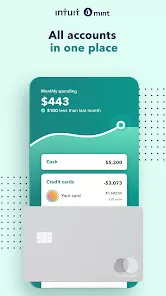
- All accounts in one place — Mint supports linking banks, credit cards, loans, and investments so you can see your full financial picture. :contentReference[oaicite:0]{index=0}
- Automatic categorization — The app sorts expenses into categories (food, travel, bills, etc.) so users don’t need to manually tag each expense. :contentReference[oaicite:1]{index=1}
- Alerts and reminders — Mint can notify you of upcoming bills, low balances, budget overruns, or unusual transactions. :contentReference[oaicite:2]{index=2}
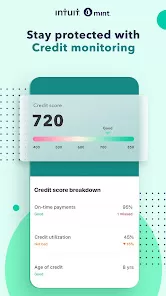
- Free credit score & credit monitoring — As part of its dashboard, Mint provides users a free credit score and periodic updates. :contentReference[oaicite:3]{index=3}
- Visual dashboards & trend analytics — Charts, graphs, and trend summaries help identify patterns in income and spending over time. :contentReference[oaicite:4]{index=4}
- Goal setting & tracking — You can set targets (saving, debt payoff, etc.) and monitor progress within the app. :contentReference[oaicite:5]{index=5}
- No subscription fee in the core version — the basic functions of Mint were available without recurring cost. :contentReference[oaicite:6]{index=6}
- Cons:
- Sync and connectivity issues — some users report trouble connecting or maintaining links with certain financial institutions. :contentReference[oaicite:7]{index=7}
- Frequent advertisements & upsell offers — the free version included ads and promotional offers. :contentReference[oaicite:8]{index=8}
- No support for joint accounts (in many cases) — you can’t formally share a single Mint account with another individual. :contentReference[oaicite:9]{index=9}
- Errors in categorization — automatic classification is not perfect; expenses sometimes end up in wrong categories. :contentReference[oaicite:10]{index=10}
- Limited investment analysis — Mint is not strong as a tool for deep investing portfolio advice or asset allocation. :contentReference[oaicite:11]{index=11}
- Data export and backup are limited — exporting full data to other systems is not as robust. :contentReference[oaicite:12]{index=12}
- Dependence on third‑party connections — if a bank changes its API or credentials, syncing can break. :contentReference[oaicite:13]{index=13}
- Shut down announced by Intuit — Mint is no longer active (as of Jan 1, 2024) and users were encouraged to migrate. :contentReference[oaicite:14]{index=14}
Key Features
- Account aggregation — link multiple types of financial accounts (checking, savings, credit, loans, investments). :contentReference[oaicite:15]{index=15}
- Automatic transaction import & categorization — transactions get pulled and classified automatically. :contentReference[oaicite:16]{index=16}
- Custom budgets and category limits — set monthly or custom budgets per spending category and monitor usage. :contentReference[oaicite:17]{index=17}
- Alerts & notifications — warnings for overspending, low balances, bill due dates, unusual activity. :contentReference[oaicite:18]{index=18}
- Credit score & credit profile dashboard — free access to credit score data and credit monitoring. :contentReference[oaicite:19]{index=19}
- Net worth tracking — combining assets and liabilities for a snapshot of overall financial health. :contentReference[oaicite:20]{index=20}
- Goal tracking — supports goals like saving, paying down debt, or emergency fund building. :contentReference[oaicite:21]{index=21}
- Visual graphs & trend analytics — spending trends, income vs expense over time, and reports. :contentReference[oaicite:22]{index=22}
- Tagging and splitting transactions — let users split one transaction into multiple categories or add tags. :contentReference[oaicite:23]{index=23}
- Bill tracking & reminders — track upcoming bills and set reminders so you don’t miss due dates. :contentReference[oaicite:24]{index=24}
- Premium features (ad removal, advanced insights) — in some versions, optional paid enhancements. :contentReference[oaicite:25]{index=25}
Functions
- Transaction ingestion — periodically fetch new transactions from linked financial institutions. :contentReference[oaicite:26]{index=26}
- Automated categorization — assign categories (food, entertainment, utilities, etc.) to transactions based on merchant and history. :contentReference[oaicite:27]{index=27}
- User recategorization / override — allow users to reclassify or split transactions manually when miscategorization occurs. :contentReference[oaicite:28]{index=28}
- Budget usage tracking — compare actual spending vs. budgeted amount in each category in real time. :contentReference[oaicite:29]{index=29}
- Alerts & triggers — activate notifications when you approach or exceed budgets, bills due, or suspicious activity. :contentReference[oaicite:30]{index=30}
- Credit score monitoring — update and display your credit score and alert for changes. :contentReference[oaicite:31]{index=31}
- Trend and report generation — produce reports and visuals on spending, income, category breakdowns over time. :contentReference[oaicite:32]{index=32}
- Goal progress measurement — compute progress toward saving goals or debt payoff targets. :contentReference[oaicite:33]{index=33}
- Net worth calculation — sum up assets minus liabilities to derive your net worth. :contentReference[oaicite:34]{index=34}
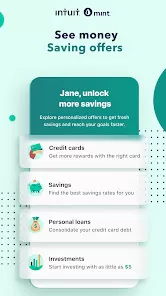
- Offer & recommendation engine — propose financial products, refinancing options, or cost‑saving suggestions (sometimes integrated with partner offers). :contentReference[oaicite:35]{index=35}
How to Use Mint
- Sign Up & Create Account — Download the Mint app (or web version) and register with email, username, and provide required personal info. Add security settings. :contentReference[oaicite:36]{index=36}
- Link Financial Accounts — Connect your checking, savings, credit cards, loans, investment accounts by entering credentials. Confirm via multi‑factor steps. :contentReference[oaicite:37]{index=37}
- Authorize Permissions — Grant read‑only access so Mint can safely fetch transaction data without transferring money. :contentReference[oaicite:38]{index=38}
- Review Imported Transactions — Inspect recent transactions, correct miscategorized items, split as needed, add tags or notes. :contentReference[oaicite:39]{index=39}
- Set Up Budgets & Category Limits — Define monthly or custom budgets per spending category. Adjust amounts based on expectations. :contentReference[oaicite:40]{index=40}
- Enable Alerts & Reminders — Configure alerts for low balances, upcoming bills, overbudget thresholds, or unusual spending. :contentReference[oaicite:41]{index=41}
- Set Financial Goals — Create goals for savings, debt repayment, or targets. Track progress as Mint updates periodically. :contentReference[oaicite:42]{index=42}
- Monitor Trends & Reports — Use built‑in visualizations to examine spending trends, income vs expenses, and review monthly changes. :contentReference[oaicite:43]{index=43}
- Check Credit Score & Alerts — Review your credit score dashboard, note changes, and follow recommended actions. :contentReference[oaicite:44]{index=44}
- Respond to Alerts — When an alert triggers (budget exceeded, bill due), open the app, investigate, adjust spending or budgets. :contentReference[oaicite:45]{index=45}
- Adjust Budgets & Categories Continuously — Over time, refine category limits, priorities, and reassign categories as needed based on actual behavior. :contentReference[oaicite:46]{index=46}
- Export or Archive Data (if available) — Use any export features to back up transactions or analysis for personal records. :contentReference[oaicite:47]{index=47}
- Migrate from Mint (if needed) — Since Mint has shut down, users were encouraged to migrate data to other tools (e.g. Credit Karma) or export for use elsewhere. :contentReference[oaicite:48]{index=48}



 0
0