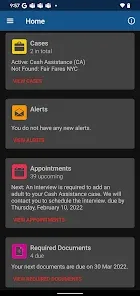
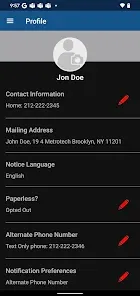
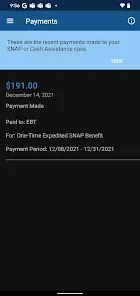
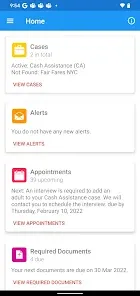
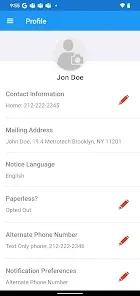
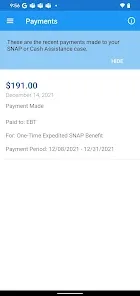
NYC ACCESS HRA is an online portal developed by the New York City Human Resources Administration (HRA) that allows residents to apply for, manage, and track a variety of public assistance programs. These programs include food assistance (SNAP), cash benefits, Medicaid, rental assistance, and other supportive services designed to help eligible individuals and families improve their financial stability and well-being. The platform offers a convenient, secure, and accessible way to interact with HRA services without needing to visit an office in person. By streamlining application processes and providing real-time updates, NYC ACCESS HRA helps residents access vital resources efficiently while promoting transparency and ease of use.
Pros and Cons
Pros:
Easy access to multiple public assistance programs through a single online platform.
24/7 availability, allowing users to apply or check status anytime without visiting offices.
Secure portal protecting personal and sensitive information.
Real-time status updates on applications and benefits.
Reduces paperwork and processing time compared to manual applications.
Mobile-friendly design improves access via smartphones and tablets.
Multilingual support accommodates diverse NYC populations.
Cons:
Some users may face difficulties with digital literacy or internet access.
Technical glitches or slow loading times reported during peak usage.
Limited personalized support available through the platform itself.
Certain complex cases may still require in-person appointments.
Navigation can be confusing for first-time users without guidance.
Document upload process may be challenging for some users.
Key Features
Online application and recertification for SNAP, Medicaid, cash assistance, and other benefits.
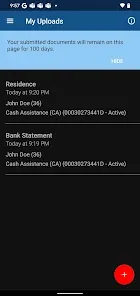
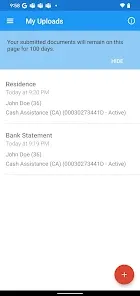
Ability to upload required documents directly through the portal.
Real-time tracking of application status and notifications for upcoming deadlines.
Access to case information, appointment schedules, and communication history.
Secure messaging system to communicate with HRA caseworkers.
Multilingual interface supporting English, Spanish, Chinese, and more.
Mobile-responsive design for ease of use on various devices.
Helpful resources and FAQs to guide users through processes.
Functions
Streamline application processes for multiple public assistance programs in NYC.
Provide applicants with instant feedback and updates on their benefit status.
Allow secure submission and management of personal and financial documents.
Enable scheduling, rescheduling, or canceling appointments with HRA representatives.
Offer access to case details and support communications through a centralized portal.
Improve overall efficiency and reduce in-person office visits during high-demand periods.
Support eligibility verification through integrated data sharing and document review.
Educate users about program requirements and available assistance options.
How to Use NYC ACCESS HRA
Step 1: Create an Account – Visit the NYC ACCESS HRA website and register by providing basic personal information and creating login credentials.
Step 2: Select Your Benefit Program – Choose the program(s) you wish to apply for, such as SNAP, Medicaid, or cash assistance.
Step 3: Complete the Application – Fill out the online application form with accurate details regarding income, household members, and other required information.
Step 4: Upload Documents – Attach necessary verification documents like ID, income proof, and residency papers directly through the portal.
Step 5: Submit Application – Review your information and submit your application for processing.
Step 6: Track Your Case – Log in regularly to monitor application status, receive notifications, and check for requests from caseworkers.
Step 7: Communicate with HRA – Use the secure messaging feature to respond to inquiries or provide additional information as needed.
Step 8: Recertify or Renew Benefits – Use the portal to submit recertification forms on time to avoid disruption of benefits.
Step 9: Get Support – If needed, access help guides on the website or contact HRA customer service for assistance.


 0
0