
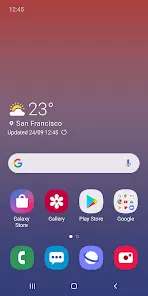
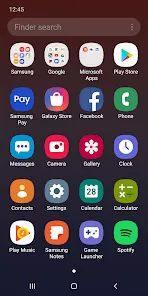
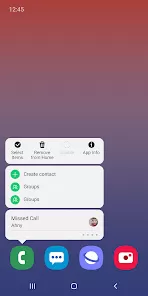
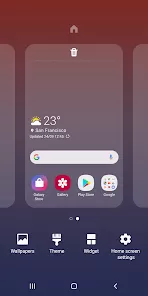
Samsung One UI Home is the official launcher for Samsung Galaxy devices, designed to provide a smooth, intuitive, and customizable user interface. It allows users to manage their home screens, app layouts, and widgets efficiently while maintaining a visually appealing and consistent design. One UI Home emphasizes ease of use with features like gesture navigation, edge panels, and adaptive icons for a cleaner interface. It integrates seamlessly with Samsung’s ecosystem, including apps like Samsung Notes, Samsung Pay, and Bixby, enhancing device functionality. With frequent updates and support for themes, wallpapers, and icon packs, Samsung One UI Home offers a modern, flexible, and highly personalized user experience for Galaxy smartphone users.
Pros and Cons
- Pros:
- Intuitive and user-friendly interface for easy navigation.
- Highly customizable home screens, widgets, and app layouts.
- Supports gesture navigation for smooth interactions.
- Integration with Samsung ecosystem apps and services.
- Adaptive icons and themes for a consistent visual experience.
- Frequent updates enhance performance and add new features.
- Edge panels provide quick access to apps and tools.
- Cons:
- Limited availability on non-Samsung devices.
- Some advanced features require Samsung account or services.
- Updates may occasionally cause temporary performance issues.
- Customization options may be overwhelming for new users.
- Battery and resource usage can increase with heavy widget use.
Key Features
- Customizable home screens and app layouts.
- Gesture-based navigation for smooth operation.
- Edge panels for quick access to apps, tools, and contacts.
- Adaptive icons and theme support for personalized aesthetics.
- Integration with Samsung apps and services like Samsung Pay and Bixby.
- Home screen search and app drawer for easy access.
- Dynamic wallpapers and lock screen customization.
- Smart suggestions and routines for efficiency.
- Support for folders and widgets to organize apps.
- Frequent updates for new features and improvements.
Functions
- Organize and customize home screens, widgets, and folders.
- Navigate the device using gestures for faster interactions.
- Access apps, tools, and contacts quickly via edge panels.
- Apply themes, wallpapers, and icon packs for a personalized look.
- Integrate with Samsung ecosystem apps for enhanced productivity.
- Use the search function to find apps, contacts, or settings efficiently.
- Create smart routines and shortcuts for repeated tasks.
- Rearrange or hide apps in the app drawer for better organization.
- Track updates and improvements for a smooth, stable experience.
- Manage notifications and home screen settings for optimal usability.
How to Use
- Samsung One UI Home comes pre-installed on Galaxy devices; open settings to access home screen options.
- Customize home screens by adding, removing, or rearranging widgets and apps.
- Apply themes, wallpapers, and icon packs via the Samsung Themes app for a personalized look.
- Enable gesture navigation in settings for smooth device interaction.
- Use edge panels to access frequently used apps, tools, and contacts quickly.
- Create folders and organize apps for easy navigation.
- Use the search bar to locate apps, contacts, and settings efficiently.
- Enable smart suggestions and routines to automate repetitive tasks.
- Check for updates regularly to maintain performance and access new features.
- Integrate with Samsung apps like Samsung Pay, Bixby, and Samsung Notes for enhanced functionality.



 0
0