




What is TeamSpeak 3 – Voice Chat
TeamSpeak 3 is a professional voice-over-IP (VoIP) application that allows users to communicate with teammates or friends through high-quality voice chat. Widely used by gamers, businesses, and online communities, TeamSpeak 3 provides low-latency audio and secure communication channels. It supports custom servers, channels, and advanced permissions, making it highly flexible for both small groups and large communities. Users can also send text messages, share files, and use push-to-talk or always-on voice options. With its robust security features, including encryption and authentication, TeamSpeak 3 ensures private and reliable communication. The platform is available on Windows, macOS, Linux, Android, and iOS, making it accessible across multiple devices.
Pros and Cons
- Pros:
- High-quality, low-latency voice communication suitable for gaming and work.
- Customizable servers and channels with advanced permission settings.
- Cross-platform support on desktop and mobile devices.
- Secure communication with encryption and authentication options.
- Supports file sharing, text chat, and push-to-talk features.
- Large community and active support forums for troubleshooting and guidance.
- Cons:
- Setting up a private server may be complex for beginners.
- Free public servers are limited; premium server hosting may incur costs.
- User interface can feel outdated compared to modern chat apps.
- Audio quality may vary depending on server setup and internet connection.
- Less integration with social platforms compared to competitors like Discord.
Key Features
- High-quality, low-latency voice communication for real-time conversations.
- Customizable server and channel structures with advanced permissions.
- Cross-platform support for Windows, macOS, Linux, Android, and iOS.
- Text messaging and file sharing within channels and private chats.
- Push-to-talk, voice activation, and always-on microphone modes.
- Encryption and secure authentication for safe communication.
- Extensive customization options for avatars, nicknames, and sound packs.
- Integration with third-party applications and plugins to extend functionality.
Functions
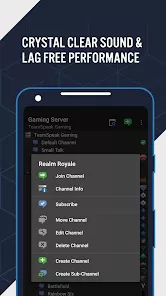
- Create or join TeamSpeak servers for private or public communication.
- Organize channels for team coordination, events, or community groups.
- Send text messages, emojis, and files to individuals or groups.
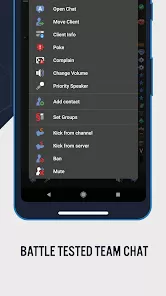
- Manage user permissions, roles, and channel access securely.
- Use push-to-talk or voice-activated modes for hands-free communication.
- Record conversations for review or moderation purposes.
- Monitor server activity and performance with administrative tools.
How to Use
- Download and install TeamSpeak 3 from the official website or app store.
- Create an account or connect as a guest to a public server.
- Join a server by entering the server address, port, and optional password.
- Navigate channels to participate in voice chats or text messaging.
- Adjust microphone, speaker, and audio settings for optimal performance.
- Use push-to-talk or voice activation to control your microphone input.
- Manage server permissions if you are an admin to control user access.
- Share files and send messages to enhance team communication.
- Log out or disconnect safely when finished using the application.


 0
0