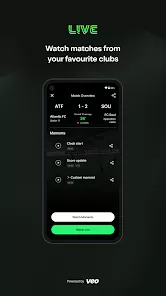
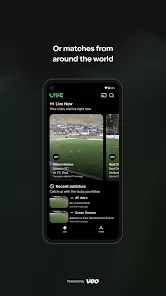

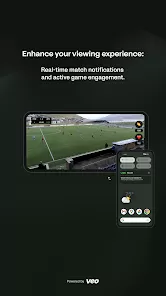
Veo Live is an innovative sports technology platform designed to enhance the way athletes, coaches, and fans experience live sports events. It offers an AI-powered solution for automatic multi-angle video recording, live streaming, and performance analysis without the need for a camera operator. The platform is widely used in football, basketball, tennis, and other sports to capture gameplay from various perspectives, enabling detailed review and coaching insights. By combining advanced hardware and software, Veo Live makes high-quality sports broadcasting and analysis accessible to amateur and professional teams alike. It promotes improved performance, engagement, and communication through real-time video sharing and analytics.
Pros & Cons
Pros:
Automatic multi-angle recording removes the need for manual camera operation.
AI-driven video analysis offers detailed performance insights.
Easy-to-use platform suitable for both amateur and professional users.
Enables live streaming, increasing fan engagement and remote accessibility.
Supports detailed post-game reviews to improve training and strategy.
Cloud storage allows easy access and sharing of recorded footage.
Portable and compact hardware design for convenient setup on any sports field.
Cons:
Initial hardware cost may be high for smaller teams or individual users.
Internet connection quality impacts live streaming performance.
Some learning curve involved in maximizing the software’s full capabilities.
Limited sports supported compared to more generic video platforms.
AI analysis may not fully replace expert human coaching insights.
Dependent on device battery life during longer games or sessions.
Key Features
Automatic Multi-Angle Recording: Uses AI to capture the game from different perspectives without manual control.
Live Streaming: Broadcast games live to fans, teammates, or scouts worldwide.
Video Analytics: Provides data-driven insights on player movement, positioning, and game tactics.
Cloud Storage: Securely saves recordings for easy retrieval and sharing.
Easy Setup: Portable hardware that can be set up quickly on the sidelines or courts.
Post-Game Review Tools: Edit, tag, and analyze game footage with intuitive software features.
Player and Team Profiles: Organize videos by player, team, or event for streamlined access.
Compatibility: Works with multiple sports including football, basketball, tennis, and more.
Mobile and Desktop Access: View and manage content across devices.
Integration with Coaching Tools: Syncs with third-party apps for enhanced training and analysis.
Functions
Automatic Game Recording: Captures all game action without manual intervention.
Real-Time Streaming: Enables live broadcasting of sports events with minimal delay.
Performance Breakdown: Analyzes player stats and positioning using AI.
Video Editing: Allows trimming, tagging, and highlighting key moments for review.
Cloud Upload and Sharing: Upload videos to the cloud and share with teammates, coaches, or fans.
Player Tracking: Tracks individual player movements to provide personalized feedback.
Match Scheduling: Organizes recordings by date, team, or competition for easy management.
Notification System: Alerts users when videos are ready for review or when live streams begin.
Multi-Device Synchronization: Syncs data and footage across mobile devices and desktops.
Security Features: Protects content with secure login and data encryption.
How to Use Veo Live
Click the button "Check All Versions" below to download and install it.
1. Purchase or Rent Veo Hardware: Obtain the camera system from Veo’s official website or authorized dealers.
2. Set Up the Camera: Place the camera on a tripod or mount at the sports venue, ensuring a clear view of the playing field.
3. Connect to Wi-Fi: Link the camera to a stable internet connection for live streaming and cloud upload.
4. Start Recording: Use the Veo app or interface to begin automatic recording of the match or training session.
5. Stream Live: Enable live streaming to share the game with remote viewers in real-time.
6. Access Videos: Once recorded, videos are uploaded to the cloud for easy access on mobile or desktop.
7. Analyze Footage: Use built-in AI tools to review player performance, movement, and tactics.
8. Edit and Tag: Highlight key moments and add notes for coaching or sharing with players.
9. Share Videos: Distribute recordings with teammates, coaches, or fans via secure links or social platforms.
10. Manage Content: Organize videos and player profiles within the Veo platform for future reference.
11. Regular Maintenance: Charge the device and update software regularly to ensure optimal performance.
12. Utilize Additional Tools: Integrate with third-party coaching apps for enhanced training sessions.


 0
0