What is Videoder - Video Downloader; Pros and Cons; Key Features; Functions; How to Use
What is Videoder
Videoder is a popular video downloader application designed for Android and Windows that allows users to download videos and music from over 1,000 websites including YouTube, Facebook, Instagram, and more. It supports downloading videos in various resolutions and formats, ranging from standard definition to 4K quality. Videoder provides a simple and intuitive interface, making it easy to search, stream, and save content offline. It also offers batch downloading and fast download speeds through multi-threading technology. The app is favored for its versatility, allowing users to convert videos to MP3, manage downloads efficiently, and enjoy ad-free usage. Videoder is a powerful tool for users looking to save media content for offline viewing.
Pros & Cons
- Pros:
- Supports downloading from more than 1,000 websites.
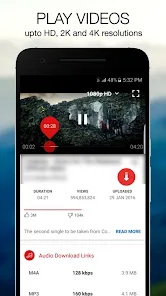
- Allows downloading in multiple resolutions, including HD and 4K.
- Batch downloading for saving multiple files simultaneously.
- Built-in search engine to find videos within the app.
- Option to convert videos to MP3 format easily.
- Fast download speeds using multi-threading technology.
- Ad-free experience enhances usability.
- User-friendly and clean interface.
- Available on both Android and Windows platforms.
- Cons:
- Not available on official app stores; requires manual installation.
- Legal and copyright issues when downloading some content.
- Some features may not work properly on certain websites due to restrictions.
- Occasional bugs or crashes reported in certain versions.
- No official iOS version available.
- Updates can be irregular and dependent on developers.
- Downloading copyrighted content without permission is against terms of service of many platforms.
Key Features
- Download videos from a vast array of sites including YouTube, Facebook, Instagram, TikTok, and more.
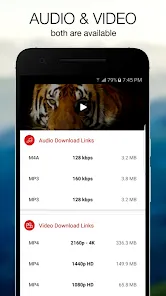
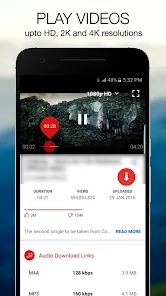
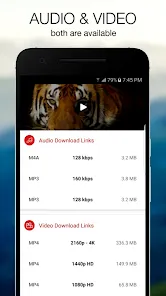
- Support for multiple video resolutions including SD, HD, Full HD, and 4K.
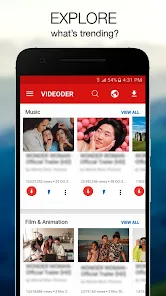
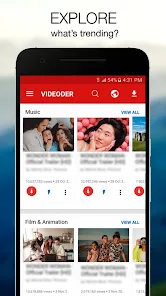
- Built-in video search engine that lets users browse content without leaving the app.
- Batch download feature for simultaneous downloading of multiple files.
- Convert videos to audio (MP3) format directly within the app.
- Multi-threaded downloading for faster speeds.
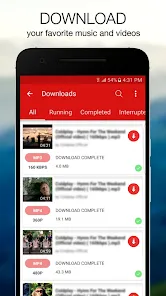
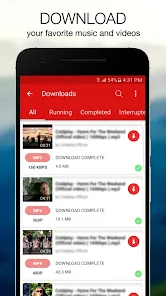
- Download manager to organize and pause/resume downloads efficiently.
- Customizable download folder and file naming options.
- Ad-free experience to avoid interruptions.
- Preview videos before downloading to verify content.
Functions
- Search and browse videos using the integrated search bar.
- Select desired video quality before downloading.
- Download multiple videos simultaneously using batch download.
- Convert downloaded videos to audio files for music listening.
- Pause, resume, or cancel downloads via the download manager.
- Organize downloaded files within customizable folders.
- Stream videos directly in the app without downloading.
- Copy and paste video URLs from other apps to initiate downloads.
- Manage download history and storage efficiently.
- Share downloaded videos or audio files easily through social media or messaging apps.
How to Use Videoder
- 1. Download and Install: Download the Videoder APK from the official website or trusted sources and install it on your Android device. For Windows, download the installer from the official site and follow the setup process.
- 2. Launch the App: Open Videoder and grant any necessary permissions such as storage access.
- 3. Search for Videos: Use the built-in search engine to find videos from supported platforms or paste a video URL directly.
- 4. Select Video Quality: Choose the preferred resolution and format from available options before downloading.
- 5. Start Download: Tap the download button to begin downloading. Use batch download if downloading multiple videos.
- 6. Manage Downloads: Monitor progress, pause, resume, or cancel downloads from the download manager.
- 7. Convert to Audio: If needed, convert downloaded videos to MP3 using the app’s conversion feature.
- 8. Access Files: Find downloaded content in the designated folder on your device or within the app.
- 9. Share or Play: Use the app or other media players to play downloaded files, or share them with others.
- 10. Keep Updated: Regularly check for app updates to ensure compatibility and access to new features.


 0
0