YouTube Studio

  •  4.3
  • Verified Safety

ADVERTORIAL

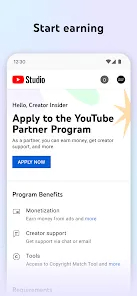
YouTube Studio is an official management platform provided by YouTube that empowers content creators to efficiently manage their channels, videos, and audience interactions. Designed for creators of all sizes, YouTube Studio offers a comprehensive set of tools that help monitor channel performance, upload and edit videos, respond to comments, and gain insights through detailed analytics. It replaces the older Creator Studio and focuses on providing a streamlined, user-friendly experience both on desktop and mobile devices. By using YouTube Studio, creators can optimize their content strategy, engage with their viewers effectively, and grow their channels through data-driven decisions and real-time updates.

Pros and Cons

Pros

  • Comprehensive analytics to track channel growth and video performance.
  • User-friendly interface that simplifies content management.
  • Allows easy editing of video details like titles, descriptions, and thumbnails.
  • Enables creators to respond to comments and moderate community engagement.
  • Supports live streaming management and scheduling of video uploads.
  • Mobile app availability for managing the channel on the go.
  • Helps with monetization tracking and revenue insights for eligible creators.
  • Integration with YouTube policies to maintain community guidelines compliance.

Cons

  • Some advanced features may be overwhelming for new creators.
  • Analytics data can sometimes experience delays or discrepancies.
  • Occasional bugs or slow load times in the web or mobile app versions.
  • Limited customization options compared to some third-party tools.
  • Requires a stable internet connection for full functionality.
  • Certain features are locked behind eligibility requirements, like monetization.

Key Features

  • Dashboard overview displaying recent activity, performance metrics, and news.
  • Real-time analytics showing views, watch time, revenue, and audience demographics.
  • Video management tools for editing metadata, thumbnails, and captions.
  • Comment moderation features, including filtering, replying, and pinning comments.
  • Monetization controls with detailed revenue tracking and settings.
  • Upload and scheduling options for videos and premieres.
  • Live stream management including chat moderation and stream health monitoring.
  • Channel customization tools like branding and layout adjustments.
  • Notification center to keep creators informed about important channel updates.
  • Mobile app support for managing channels anytime, anywhere.

Functions

  • Track overall channel performance and video-specific metrics.
  • Manage uploaded videos by updating titles, tags, descriptions, and thumbnails.
  • Engage with viewers through comment replies and moderation.
  • Monitor monetization status and review estimated earnings.
  • Schedule video releases and live streaming events.
  • Receive notifications about copyright claims, subscriber milestones, and community guidelines.
  • Analyze audience demographics and viewing habits to tailor content strategy.
  • Access copyright and policy tools to protect channel integrity.
  • Manage playlists and end screens to improve viewer retention.
  • Use mobile app for on-the-go channel management and updates.

How to Use YouTube Studio

  • Access YouTube Studio by logging into your YouTube account and clicking on your profile icon, then selecting "YouTube Studio."
  • Explore the dashboard for a quick overview of your channel’s recent activity and performance.
  • Use the "Videos" tab to upload new content or edit existing videos’ details and settings.
  • Navigate to the "Analytics" section to review detailed data on views, watch time, audience demographics, and revenue.
  • Manage comments by going to the "Comments" tab, where you can reply, delete, or report inappropriate messages.
  • Set up monetization options and track earnings under the "Monetization" section if your channel is eligible.
  • Schedule upcoming videos or premieres to maintain consistent content delivery.
  • Utilize the live streaming tools to start or manage ongoing streams and moderate live chat.
  • Customize your channel’s branding by uploading banners, watermarks, and profile pictures in the "Customization" area.
  • Download the YouTube Studio app on your mobile device to manage your channel anywhere and stay updated with notifications.

ADVERTORIAL

Similar Apps
  • 登录
社交账号登录