The BlueDriver OBD2 Scan Tool is a highly effective and user-friendly diagnostic tool designed for car owners and mechanics alike. It connects to a vehicle's On-Board Diagnostics (OBD2) port, providing real-time data and diagnostic information via a smartphone or tablet. The BlueDriver tool works in conjunction with a mobile app available for iOS and Android devices, allowing users to read and clear diagnostic trouble codes (DTCs), access sensor data, and perform advanced diagnostics. Unlike traditional OBD2 scanners, BlueDriver is unique because it offers enhanced diagnostic capabilities such as live data streaming, the ability to view freeze frame data, and access to manufacturer-specific trouble codes. This makes it an excellent choice for both DIY car enthusiasts and professionals looking for a powerful, portable diagnostic solution. The tool can help identify issues with the engine, transmission, exhaust system, and other components, saving both time and money by enabling users to identify problems before they escalate.
Pros and Cons
Pros:
Easy to Use: The BlueDriver OBD2 tool is designed for ease of use, with simple plug-and-play setup and an intuitive mobile app interface that makes reading and interpreting accessible codes to all skill levels.
Advanced Diagnostics: Unlike basic OBD2 scanners, BlueDriver provides enhanced diagnostic capabilities, including live data streaming, freeze frame data, and the ability to retrieve manufacturer-specific codes, which can help with deeper vehicle diagnostics.
Comprehensive Coverage: The tool supports over 30 different vehicle makes and models, covering a wide range of diagnostic needs for most common cars, trucks, and SUVs.
Mobile App Integration: The BlueDriver app is available for both Android and iOS, allowing users to perform diagnostics using their smartphone or tablet, making it portable and convenient for on-the-go use.
Cost-Effective: Compared to high-end professional scan tools, BlueDriver offers a much more affordable option for car owners and small mechanics without sacrificing key diagnostic features.
Real-Time Data: The tool can provide live vehicle sensor data, giving users real-time insights into things like engine temperature, fuel trims, and RPMs, which can be crucial for identifying issues.
Code Clearing and Reset: In addition to reading and interpreting DTCs, BlueDriver can also clear codes and reset warning lights, which is a valuable feature for many users who want to ensure that an issue has been properly addressed.
Cons:
Limited to OBD2 Systems: While BlueDriver supports most vehicles with OBD2 systems, it is not compatible with older vehicles or those that use other diagnostic protocols, limiting its use for classic cars or specific models.
Bluetooth Connectivity: The tool requires Bluetooth connectivity to work with your mobile device, which can sometimes be unreliable in certain environments or on older smartphones and tablets.
Limited Advanced Features for Professionals: Although BlueDriver provides great features for everyday users, professional mechanics may find it lacking some of the in-depth diagnostic functions found in higher-end scan tools.
App-Based Limitations: The app itself can occasionally experience bugs or glitches, especially during major updates or when used with certain mobile devices, which could disrupt the diagnostic process.
Subscription for Repair Reports: Although the tool provides a lot of valuable information, some users report that access to detailed repair reports requires a subscription, which may add an extra cost for users seeking comprehensive diagnostic advice.
Key Features
Enhanced Diagnostics: BlueDriver allows you to read both generic and manufacturer-specific trouble codes (DTCs), providing more detailed information than basic OBD2 scanners.
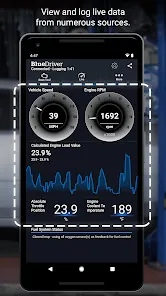
Live Data Streaming: The tool can display live sensor data, such as engine RPM, fuel trims, coolant temperature, and more, allowing users to monitor vehicle performance in real time.
Freeze Frame Data: BlueDriver captures and stores freeze frame data, providing a snapshot of your vehicle’s condition at the time of a trouble code, which can be valuable for diagnosing intermittent issues.
Bluetooth Connectivity: The tool connects wirelessly via Bluetooth to your mobile device, allowing for a simple and wireless diagnostic experience without the need for bulky cables.
Code Clearing: In addition to reading diagnostic trouble codes, BlueDriver can clear the codes and reset the “Check Engine” light, which is useful after resolving issues or verifying that a fix was successful.
Vehicle Compatibility: The device works with over 30 vehicle makes and models, covering a wide range of cars, trucks, and SUVs, with support for most OBD2-compliant vehicles made after 1996.
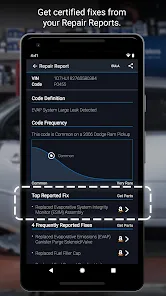
Detailed Repair Reports: After scanning, the app provides detailed repair reports, including potential fixes and cost estimates. This is particularly helpful for users looking to understand and address car issues without a mechanic’s help.
Portable and Compact: The compact design of BlueDriver makes it easy to store and transport, fitting conveniently in your glove compartment or tool kit for quick access when needed.
Functions
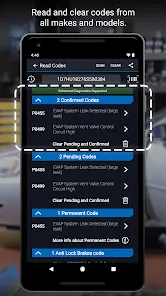
Read Diagnostic Trouble Codes (DTCs): BlueDriver reads both generic and manufacturer-specific OBD2 codes, helping users diagnose issues related to the engine, transmission, exhaust, and more.
Clear Codes and Reset Warning Lights: After a vehicle issue is resolved, BlueDriver can clear codes and reset warning lights such as the "Check Engine" light, allowing you to confirm that the issue has been addressed.
Live Data Monitoring: The tool can stream live data, including engine parameters like RPM, coolant temperature, and fuel trims, which is useful for real-time troubleshooting or performance monitoring.
Freeze Frame Data Retrieval: BlueDriver records freeze frame data whenever a trouble code is set, helping users to understand the conditions under which a fault occurred, making diagnostics more effective.
Repair Report Generation: After scanning your vehicle, the BlueDriver app generates detailed repair reports, providing troubleshooting tips, possible fixes, and even estimated repair costs.
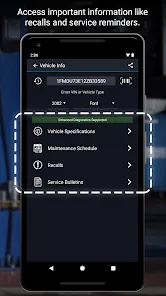
Vehicle Compatibility Check: BlueDriver supports over 30 vehicle makes and models, covering most OBD2-compliant cars, trucks, and SUVs from 1996 onward.
Live Data Graphing: The app allows users to view and analyze live data in graphical form, helping to identify trends and pinpoint specific issues in real time.
How to Use BlueDriver OBD2 Scan Tool
Click the button "Check All Versions" below to download and install it.
Step 1: Install the App: Download the BlueDriver app from the Apple App Store or Google Play Store onto your smartphone or tablet.
Step 2: Plug in the BlueDriver Device: Plug the BlueDriver OBD2 scan tool into your vehicle’s OBD2 port, typically located under the dashboard near the driver’s side.
Step 3: Turn on the Ignition: Turn your vehicle's ignition to the “ON” position (do not start the engine) to allow the scan tool to communicate with your vehicle’s systems.
Step 4: Open the App and Connect: Open the BlueDriver app on your mobile device and connect it to the scan tool via Bluetooth.
Step 5: Start Scanning: In the app, select the option to begin scanning. The app will retrieve diagnostic trouble codes (DTCs) and other relevant data from your vehicle.
Step 6: Analyze Results: Once the scan is complete, view the results, including DTCs, live data, and freeze frame information. The app will also provide suggested repairs and cost estimates.
Step 7: Clear Codes (If Necessary): If you have resolved the issue, you can clear the trouble codes and reset warning lights from within the app, allowing you to confirm the fix.
Step 8: Save or Share Reports: You can save the diagnostic report for future reference or share it with a mechanic for further assistance if needed.

 0
0