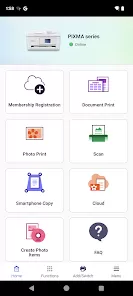
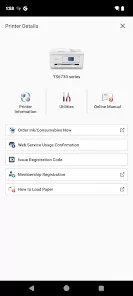
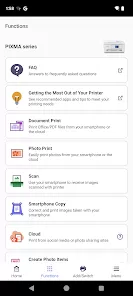
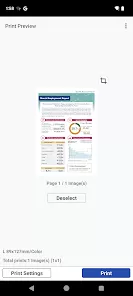
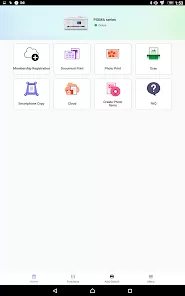
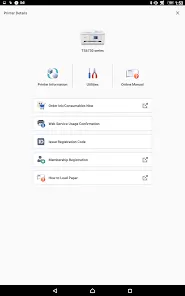
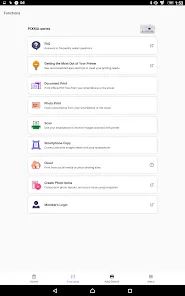
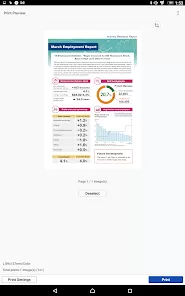
Canon PRINT is a mobile application developed by Canon to facilitate wireless printing and scanning from smartphones and tablets. Compatible with Canon PIXMA, MAXIFY, and imageCLASS printers, the app allows users to print photos, documents, and web pages directly from their mobile devices. It also supports scanning documents to save them as PDF or image files for easy sharing and storage. Canon PRINT integrates printer management features, such as checking ink levels, monitoring print jobs, and configuring printer settings remotely. Designed to simplify printing tasks and enhance productivity, the app is available for both iOS and Android devices, offering seamless and convenient printer control for home and office use.
Pros and Cons of Canon PRINT
Pros:
Wireless printing from smartphones and tablets.
Compatible with a wide range of Canon printers.
Easy scanning and saving of documents as PDF or image files.
Monitor printer status, ink levels, and print jobs remotely.
User-friendly interface for quick access to printing and scanning features.
Supports printing from cloud services like Google Drive and Dropbox.
Free to download and use with Canon printers.
Cons:
Requires compatible Canon printer models for full functionality.
Dependent on stable Wi-Fi connection for wireless printing.
Limited editing features compared to desktop printer software.
Some advanced features may not be available on all devices.
Occasional connectivity issues may occur with certain networks.
Key Features of Canon PRINT
Wireless printing of documents, photos, and web pages.
Scanning to PDF or image files for digital storage or sharing.
Printer management including ink level monitoring and job tracking.
Cloud printing from Google Drive, Dropbox, and other services.
Easy setup and configuration of Canon printers via mobile devices.
Multi-page scanning and document cropping options.
Support for duplex (double-sided) printing where applicable.
Remote control of printer settings and maintenance alerts.
User-friendly interface optimized for mobile devices.
Quick access to frequently used printing and scanning tasks.
Functions of Canon PRINT
Print photos, documents, and web pages directly from smartphones or tablets.
Scan documents to save as PDFs or image files for sharing or storage.
Monitor printer status, ink levels, and print queue in real time.
Configure printer settings remotely from a mobile device.
Print directly from cloud storage services like Google Drive or Dropbox.
Perform multi-page scanning and document editing functions.
Receive notifications about maintenance needs and ink alerts.
Access printer tutorials and troubleshooting tips within the app.
Share scanned documents via email or messaging apps.
Support for wireless and mobile-friendly printing in home or office settings.
How to Use Canon PRINT
Download the Canon PRINT app from the App Store or Google Play Store.
Ensure your Canon printer is compatible and connected to the same Wi-Fi network as your mobile device.
Open the app and select your printer from the available devices.
To print, select the document or photo from your device, cloud service, or web page.
Adjust print settings, such as paper size, color, and orientation, if needed.
Tap “Print” to send the job to your Canon printer wirelessly.
To scan, select the scanning option and place the document on the printer scanner.
Choose the output format (PDF or image) and save or share the scanned file.
Monitor ink levels, print jobs, and maintenance alerts through the app dashboard.
Regularly update the app for new features and printer compatibility improvements.


0