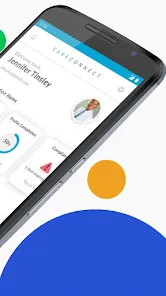
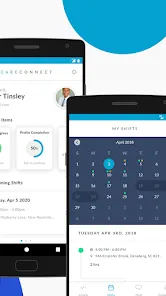
CareConnect is a technology platform and mobile application designed primarily for home care agencies and caregivers, enabling streamlined staffing, scheduling, compliance, and communication. By combining AI‑powered tools, real‑time shift broadcasting, integration with agency management systems, and compliance tracking, CareConnect helps agencies match caregivers with open shifts more efficiently. It simplifies recruitment, engagement, and retention of caregivers while giving caregivers a mobile interface to view available shifts, manage their schedules, complete required training, and stay compliant. Its aim is to bridge operational gaps in home care, reduce manual work, and enhance transparency between agency coordinators and field caregivers.
Pros & Cons
Pros:
Efficient shift matching: broadcasts open shifts directly to caregivers, helping agencies fill gaps faster. :contentReference[oaicite:0]{index=0}
Integration with agency tools: works with existing agency management systems via APIs or single sign-on. :contentReference[oaicite:1]{index=1}
Compliance and credential tracking: helps automate onboarding, background checks, medical / occupational health screenings integrated into recruitment. :contentReference[oaicite:2]{index=2}
User convenience: caregivers can view shifts, set preferences, request shifts, manage availability, and communicate with agency contacts. :contentReference[oaicite:3]{index=3}
Data and analytics: agencies can monitor caregiver adoption, fill rates, turnover, and optimize workforce operations. :contentReference[oaicite:4]{index=4}
Customizable occupational health scheduling: agencies can schedule required medical screenings directly via the system, saving manual steps. :contentReference[oaicite:5]{index=5}
Cons:
Technical issues: some users report app freezing, login errors, limited functionality in certain sections (e.g. shift assignment delays). :contentReference[oaicite:6]{index=6}
Feature limitations: caregivers sometimes cannot clock in/out or input detailed preferences such as availability or languages. :contentReference[oaicite:7]{index=7}
Access restrictions: caregivers must be invited by an agency to activate the app, limiting openness for newcomers. :contentReference[oaicite:8]{index=8}
Reliance on internet and system stability: downtime or connectivity issues can impair shift broadcasting or updates. (General risk for cloud apps)
Learning curve for staff: agencies must adapt workflows and train coordinators and caregivers to use the system effectively.
Costs & subscription: advanced features, integrations, or occupational health modules may incur additional costs or licensing. :contentReference[oaicite:9]{index=9}
Key Features
**ShiftMatch.AI**: AI‑powered shift assignment and matching logic to reduce overtime and optimize caregiver allocation. :contentReference[oaicite:10]{index=10}
**Integration / Single Sign‑On (SSO)**: Seamless login between CareConnect and agency systems like HHAeXchange. :contentReference[oaicite:11]{index=11}
**Broadcasting and open shift posting**: Agencies publish open shifts to caregivers via the app. :contentReference[oaicite:12]{index=12}
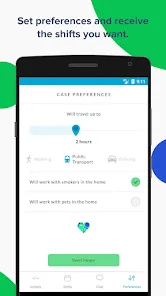
**Caregiver preferences & availability**: Caregivers can set work preferences (locations, clients, times). :contentReference[oaicite:13]{index=13}
**Compliance & credential management**: Track credentials, licensing, background checks, and expiration dates. :contentReference[oaicite:14]{index=14}
**Occupational health integration**: Pre‑hire medical screenings integrated into ATS and scheduling workflows. :contentReference[oaicite:15]{index=15}
**Analytics & reporting dashboards**: Metrics for adoption, shift fill rates, turnover, caregiver utilization. :contentReference[oaicite:16]{index=16}
**Notifications & alerts**: Real‑time alerts for new shift posts, assignment updates, training reminders. :contentReference[oaicite:17]{index=17}
**eLearning / training modules**: In‑app or linked training (in‑service) compliance tracking. :contentReference[oaicite:18]{index=18}
**APIs & system interoperability**: Connect with agency management software, payroll, HR systems. :contentReference[oaicite:19]{index=19}
Functions (What It Lets You Do)
Publish and broadcast open shift opportunities to eligible caregivers.
Automatically match caregivers to shifts based on preferences, skills, location, and cost considerations.
Allow caregivers to view, claim, or request shifts directly in the app.
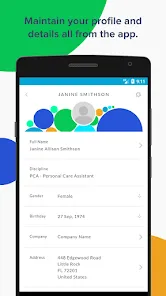
Manage caregiver profiles including credentials, availability, preferences, and contact info.
Track credential expirations, license renewals, background checks, and compliance statuses.
Schedule and integrate occupational health screenings (pre‑hire medicals) with the hiring flow. :contentReference[oaicite:20]{index=20}
Generate analytics about workforce efficiency, shift fill rates, turnover trends, and caregiver engagement.
Send notifications to caregivers for shift assignments, cancellations, reminders, or training needs.
Enable caregivers to manage their work availability and preferences (days, times, distance). :contentReference[oaicite:21]{index=21}
Support eLearning or in‑service modules for caregiver training, and track their progress. :contentReference[oaicite:22]{index=22}
Integrate with external systems: agency management software, HR tools, payroll, and other platforms. :contentReference[oaicite:23]{index=23}
Streamline onboarding by automating credential checks, compliance validation, and shift eligibility determination.
How to Use CareConnect (Step by Step)
Click the button "Check All Versions" below to download and install it.
Agency setup / onboarding:
The agency subscribes or licenses CareConnect and configures its integration with existing management or HR systems.
Define caregiver roles, credential requirements, and shift categories in the system.
Invite caregivers by email or phone to register on the CareConnect mobile app. :contentReference[oaicite:24]{index=24}
Set up broadcast rules and matching logic (ShiftMatch.AI criteria) to filter eligible caregivers automatically. :contentReference[oaicite:25]{index=25}
Configure compliance workflows (background checks, medical screenings) and connect occupational health services. :contentReference[oaicite:26]{index=26}
Caregiver registration & profile setup:
The caregiver receives an invitation link (via email or SMS) and installs the app on their device. :contentReference[oaicite:27]{index=27}
Create a profile: enter personal details, credentials, work preferences, availability, and client preferences. :contentReference[oaicite:28]{index=28}
Complete any required training or compliance modules (eLearning) via the app. :contentReference[oaicite:29]{index=29}
Using the app to receive and pick shifts:
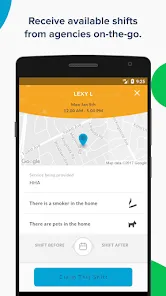
CareConnect broadcasts open shifts matching the caregiver’s criteria. :contentReference[oaicite:30]{index=30}
The caregiver views available shifts in the app and chooses or accepts them. :contentReference[oaicite:31]{index=31}
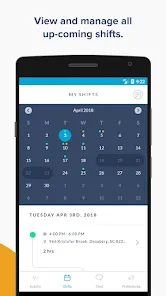
Once accepted, the caregiver gets shift details (client, location, time, special notes) and reminders.
If there is a cancellation or change, the caregiver receives a push notification or alert.
Managing schedules and availability:
Caregivers can update their availability (times, days, distance preferences) inside the app. :contentReference[oaicite:32]{index=32}
Set preferences for preferred clients, travel limits, or shift types. :contentReference[oaicite:33]{index=33}
Review upcoming schedule and accept or decline shift proposals. :contentReference[oaicite:34]{index=34}
Compliance & credential tracking:
Upload documents (licenses, certifications) and verify they meet agency requirements.
Receive reminders when credentials are about to expire or renewals are needed.
Attend scheduled occupational health screenings or medical checks via integrated booking. :contentReference[oaicite:35]{index=35}
Analytics, monitoring, and optimization:
Agency administrators access dashboards showing shift fill rates, caregiver engagement, turnover, and performance metrics. :contentReference[oaicite:36]{index=36}
Adjust matching rules, broadcast settings, or staffing policies based on insights.
Identify underused caregivers or overworked ones and rebalance.
Run reports on compliance, fulfillment, and cost savings.
Maintenance & updates:
Regularly update the app on devices to get new features or bug fixes. (Note: older versions may stop working.) :contentReference[oaicite:37]{index=37}
Support staff and caregivers should receive ongoing training to adopt new features.
Review integration points (APIs, data exchange) to ensure consistency with agency systems.


 0
0