
FitCloudPro

  •  3.7
  • Verified Safety

ADVERTORIAL

What is FitCloudPro; Pros and Cons; Key Features; Functions; How to Use

What is FitCloudPro?

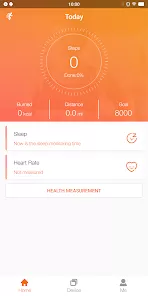
FitCloudPro is a health and fitness application designed to work in tandem with various wearable devices and smartwatches. It provides comprehensive tracking of physical activities, heart rate, sleep patterns, and other vital health metrics. The app aims to help users monitor their fitness goals, analyze trends, and improve overall well-being through intuitive data visualization and personalized insights. FitCloudPro supports real-time data syncing with multiple wearable brands, making it versatile and accessible. The application also offers reminders, exercise logs, and health reports, assisting users in maintaining a healthy lifestyle. Its user-friendly interface and detailed health tracking features make FitCloudPro a popular choice for fitness enthusiasts and individuals seeking to improve their health.

Pros and Cons

  • Pros:
    • Comprehensive health tracking including heart rate, steps, sleep, and calories.
    • Compatible with a wide range of wearable devices and smartwatches.
    • User-friendly interface with clear data visualization.
    • Real-time syncing ensures up-to-date health metrics.
    • Offers personalized insights and fitness goal tracking.
    • Includes reminders for physical activity and hydration.
    • Free to download with optional premium features.
  • Cons:
    • Some users report occasional syncing delays with certain devices.
    • Limited advanced workout plans compared to specialized fitness apps.
    • Occasional ads in the free version may disrupt user experience.
    • Data privacy concerns depending on device permissions and syncing.
    • Customer support responsiveness varies by region.

Key Features

  • Real-time tracking of heart rate, steps, distance, and calories burned.
  • Sleep monitoring with analysis of deep, light, and REM sleep stages.
  • Integration with various wearable brands for versatile device support.
  • Personalized fitness goals and progress tracking dashboards.
  • Activity reminders to encourage regular movement and hydration.
  • Historical health data trends for long-term wellness insights.
  • Customizable alerts for heart rate abnormalities or inactivity.
  • Syncs with smartphone notifications to keep users informed.

Functions

  • Health Monitoring: Continuously track vital signs such as heart rate and blood oxygen levels.
  • Step Counting: Record daily steps, distance traveled, and estimate calories burned.
  • Sleep Analysis: Monitor sleep duration and quality, providing detailed breakdowns of sleep cycles.
  • Goal Setting: Set and adjust personalized fitness and health targets.
  • Reminders and Alerts: Receive notifications to stay active and maintain hydration.
  • Data Syncing: Seamlessly sync data from wearable devices to the app in real-time.
  • Progress Reports: Access daily, weekly, and monthly summaries to track improvements.
  • Notification Management: Manage incoming calls, messages, and app alerts through connected devices.

How to Use FitCloudPro

  • Download and Install: Obtain the FitCloudPro app from the Apple App Store or Google Play Store.
  • Create an Account: Sign up using your email or connect through social media accounts for personalized access.
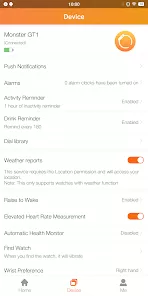
  • Pair Your Device: Connect your compatible wearable or smartwatch via Bluetooth to sync data.
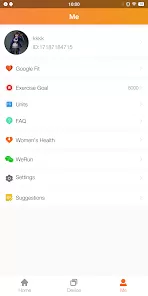
  • Set Fitness Goals: Define daily or weekly targets such as steps, calories, or sleep hours.
  • Enable Notifications: Allow the app to send reminders for activity, hydration, and alerts for important notifications.
  • Track Your Progress: Monitor your health metrics in real-time through the app’s dashboard.
  • Review Reports: Access historical data and summaries to analyze trends and adjust goals accordingly.
  • Customize Settings: Adjust app preferences, notification settings, and device connections as needed.
  • Use Additional Features: Explore premium options or integrate with other health apps for enhanced tracking.

ADVERTORIAL

User comments

3

Watch works fine. Unfortunately, the app does not. Despite my wifi being turned on, it cannot connect to network. I also don't get group texts pushed to the watch and currently can't login on the app, making app and watch not useful. please do a new update to fix this issue. i tried uninstalling and reinstalling app as well as restarting both devices."

3

Watch works fine and I like the face options, but its calorie tracker is way off. It doesn't include a lot of basic workouts, but does include some pretty niche things (Long Jump? But not weight training? Seriously?). Yoga is one of my primary workouts, where you are meant to keep your heart rate and breath slow. I can do a whole 45-60 minutes just to have the watch say it's too little data to save. It gives the same message for walking without moving your hand enough. Needs some updating."

4

Watch works good for what it is. The app pairs well but it is missing some features. The reason why some of you can not receive text messages is because this app and watch does not work with RCS messages. Therefore, if you have it on, you won't get the notifications to your watch. If you turn RCS off, the notifications start working but it messes with text."

Similar Apps
  • 登录
社交账号登录