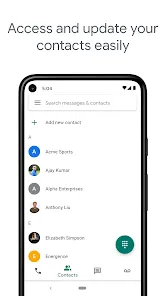



Google Voice is a cloud-based communication service that provides users with a virtual phone number, enabling them to make and receive calls, send text messages, and voicemail messages, all from one centralized platform. Available on both mobile devices and computers, Google Voice seamlessly integrates with Google’s ecosystem, making it a popular choice for individuals and businesses looking for flexibility in their communication tools. Users can link Google Voice to their existing phone number, allowing them to forward calls, manage messages, and access voicemail messages from any device. Google Voice’s user-friendly interface and affordability have made it an ideal solution for people who require an additional line or wish to separate work and personal communications. Furthermore, the service offers advanced features like call screening, call blocking, and integration with Google Calendar for scheduling purposes. Google Voice can be used internationally, making it a versatile tool for users across the globe.
Pros of Google Voice
Free Local Calls: Google Voice offers free calls to the U.S. and Canada, making it a cost-effective solution for users within North America.
Cross-Platform Integration: Google Voice can be accessed on both mobile devices (iOS and Android) and desktop computers, offering flexibility in communication.
Multiple Device Synchronization: Users can sync their Google Voice account across multiple devices, allowing them to receive calls, texts, and voicemail messages on any device.
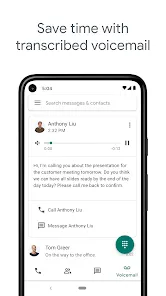
Voicemail Transcription: The service provides voicemail transcription, which converts voicemail messages into text for easy reading and management.
Customizable Call Forwarding: Google Voice allows users to forward calls to different phone numbers, making it convenient for managing multiple devices or lines.
Call Screening and Blocking: Users can screen calls by listening to the caller's name and decide whether to answer. Additionally, unwanted numbers can be blocked for enhanced privacy.
International Calling: Google Voice provides competitive rates for international calls, making it a budget-friendly choice for global communication.
Cons of Google Voice
Limited International Availability: Google Voice is not available in every country, limiting its use for international users in certain regions.
Requires a Google Account: Users must have a Google account to access Google Voice, which may be a barrier for those who prefer not to use Google’s services.
Dependent on Internet Connection: Since Google Voice operates over the internet, users require a stable Wi-Fi or cellular data connection for reliable service.
Limited Features for Businesses: While Google Voice can work for small businesses, it lacks some advanced business features that other dedicated VoIP services offer, such as advanced call routing or call center integrations.
Not Suitable for Emergency Services: Google Voice does not support 911 emergency services, which may be a critical drawback for users relying on it as their primary phone number.
Call Quality May Vary: Depending on internet connection speed, the quality of calls can sometimes be affected, leading to dropped calls or poor sound quality.
Key Features of Google Voice
Virtual Phone Number: Google Voice assigns users a unique virtual phone number that can be used for voice calls, text messages, and voicemail management.
Voicemail Transcription: Voicemail messages are automatically transcribed into text and sent to users via email or text, enabling them to read messages without listening to them.
Call Forwarding: Users can set up call forwarding to forward calls to other phone numbers, allowing them to receive calls on multiple devices or locations.
Call Screening and Blocking: Google Voice allows users to screen calls before answering by listening to the caller’s name. It also has the option to block unwanted calls.
Text Messaging: Google Voice enables users to send and receive text messages, making it a convenient messaging solution in addition to voice communication.
International Calling: Google Voice offers affordable rates for international calls, making it an economical option for users who need to make calls abroad.
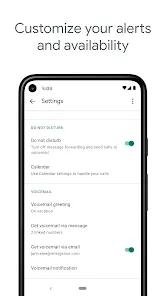
Voicemail Greeting Customization: Users can set up personalized voicemail greetings for different situations, such as work hours, vacations, or personal messages.
Functions of Google Voice
Making and Receiving Calls: Google Voice allows users to make and receive calls via their virtual phone number, regardless of location or device.
Text Messaging: Send and receive text messages from the Google Voice number, which can be accessed on both mobile devices and desktop computers.
Voicemail Management: Users can listen to or read voicemail messages, customize voicemail greetings, and access transcriptions of missed calls.
Call Forwarding and Filtering: Calls can be forwarded to other numbers, and users can choose to block certain numbers, ensuring better control over incoming communication.
International Calls: Google Voice provides international calling at competitive rates, allowing users to make calls worldwide at affordable prices.
Call Screening: Google Voice can screen calls by announcing the name of the caller, giving users the opportunity to decide whether or not to answer the call.
How to Use Google Voice
Click the button "Check All Versions" below to download and install it.
Step 1: Create a Google Account: If you don’t already have a Google account, you’ll need to create one at Google's sign-up page.
Step 2: Access Google Voice: Go to the Google Voice website (voice.google.com) or download the Google Voice app from the App Store (iOS) or Google Play Store (Android).
Step 3: Select a Virtual Phone Number: During the sign-up process, you will be prompted to choose a virtual phone number based on your location or preferences.
Step 4: Link Your Existing Phone Number: You can link your existing phone number to Google Voice, allowing you to forward calls and text messages to that number if needed.
Step 5: Customize Your Settings: Personalize your voicemail greeting, call forwarding preferences, and notification settings according to your needs.
Step 6: Make and Receive Calls: Start using Google Voice to make and receive calls from any device with an internet connection, including your smartphone or computer.
Step 7: Manage Voicemail and Texts: Use the Google Voice app or website to access your voicemail messages, read text messages, and manage call logs.
Step 8: Add Additional Devices: Sync Google Voice with multiple devices to access your calls, messages, and voicemail from anywhere.


0