Gospel Library

  •  4.7
  • Verified Safety

ADVERTORIAL

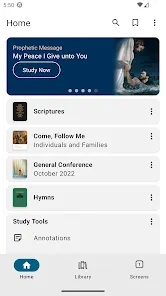
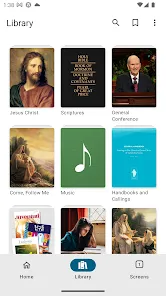
Gospel Library is a free mobile app developed by The Church of Jesus Christ of Latter-day Saints, designed to provide users with access to a wide array of digital gospel-related materials. It serves as a comprehensive resource for study, teaching, and inspiration, offering scriptures, conference talks, manuals, videos, and more. Available on Android, iOS, and Windows devices, the Gospel Library app allows users to study the teachings of the Church anywhere and anytime, whether online or offline. The app offers a rich collection of content from the Bible, Book of Mormon, Doctrine and Covenants, Pearl of Great Price, as well as other gospel literature and resources that are essential for Latter-day Saints. The Gospel Library also includes daily scripture readings, study aids, and the ability to mark and highlight scriptures, making it a valuable tool for individual and family study. Whether preparing for lessons, personal devotion, or simply deepening one's understanding of the gospel, Gospel Library brings essential spiritual resources directly to your fingertips.

Pros and Cons

  • Pros:

    • Free to Use: Gospel Library is completely free to download and use, offering a wealth of resources without any cost to users.

    • Offline Access: Once content is downloaded, you can access your gospel materials offline, making it convenient for studying in areas with limited or no internet connectivity.

    • Comprehensive Resource: The app offers a vast collection of scriptures, general conference talks, study guides, videos, and more, all in one place.

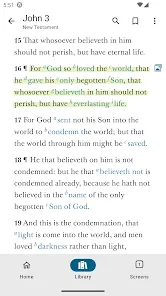
    • Customizable Study Tools: You can highlight, bookmark, and add notes to scriptures or talks, allowing for personalized and in-depth study.

    • Sync Across Devices: Your study progress, bookmarks, and notes are automatically synced across all devices using your LDS account, ensuring continuity across platforms.

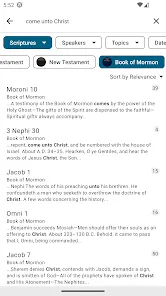
    • Search Functionality: The app has a powerful search feature that allows users to quickly find scriptures, talks, or other materials by keywords or topics.

  • Cons:

    • Storage Usage: Downloading large volumes of content can take up considerable storage space on your device, especially if you opt for offline access to a variety of resources.

    • Learning Curve: For some users, the app can be overwhelming at first due to the sheer amount of content and features available, requiring a learning period to fully navigate the interface.

    • Device Compatibility: Although Gospel Library is available on many platforms, older devices or those with limited processing power may experience slower load times or occasional crashes.

    • Internet Dependency for Updates: While content can be accessed offline, updates to materials, such as new conference talks or scripture translations, require an internet connection.

    • Limited Customization: Despite its many features, there are still limits to how much users can customize the interface or the layout of materials to their exact preferences.

Key Features

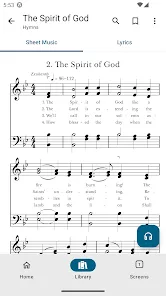
  • Scriptures and Study Materials: The app includes all the standard works of the Church, including the Bible, Book of Mormon, Doctrine and Covenants, and Pearl of Great Price, along with various study aids like footnotes and cross-references.

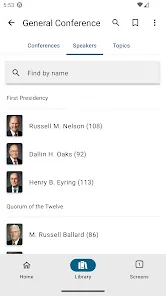
  • General Conference Talks: Gospel Library provides access to talks from general conference, including current and past sessions, organized by speaker and year.

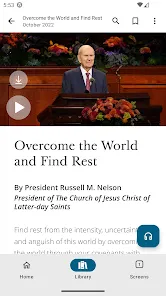
  • Audio and Video Resources: Users can listen to or watch gospel-related videos, including talks, lessons, and special events, directly from the app.

  • Study Tools: Highlight and bookmark scriptures, add personal notes, and create custom reading plans to organize your gospel study in a meaningful way.

  • Offline Access: Download content for offline use, so you can access your favorite scriptures and talks even when you don’t have internet access.

  • Search Function: A robust search function allows you to quickly find any scripture, talk, or resource by entering keywords, topics, or even scripture references.

  • Family and Lesson Resources: The app includes resources for teaching and family study, such as lesson manuals, activity ideas, and children’s materials.

  • Customizable Interface: Choose from a variety of fonts and background colors to personalize your reading experience, improving readability and comfort during study sessions.

Functions

  • Scripture Study: The main function of the Gospel Library app is scripture study. Users can access all the standard works and study them with tools such as footnotes, cross-references, and highlights.

  • General Conference Viewing: Watch or listen to past and current general conference sessions, allowing users to stay updated with Church teachings and guidance.

  • Notes and Highlights: You can annotate scriptures and talks by highlighting passages or adding personal notes, which can be saved for future reference.

  • Offline Content: Download specific content (scriptures, conference talks, manuals, etc.) for offline access, making it ideal for areas with limited or no internet access.

  • Search and Find: Use the search function to locate specific scriptures, lessons, talks, or topics, enhancing the efficiency of your study sessions.

  • Share and Collaborate: Share your notes, highlights, and thoughts with others or use the app to collaborate with family members or fellow Church members on study or lesson plans.

  • Family and Youth Content: The app also offers specific resources for children and youth, including age-appropriate study materials, activities, and lessons.

How to Use Gospel Library

Click the button "Check All Versions" below to download and install it.

  • Download the App: Start by downloading the Gospel Library app from the Google Play Store, Apple App Store, or Microsoft Store, depending on your device.

  • Sign In: Sign in with your LDS account to sync your content, notes, and study progress across all your devices.

  • Choose Your Content: Browse through the app’s categories (Scriptures, Talks, Manuals, Videos, etc.) and select the material you wish to study. You can also download content for offline use by tapping the download icon next to each resource.

  • Customize Your Study: Use the highlighting tool to mark important scriptures or add notes to passages. You can also adjust the font size and background color for more comfortable reading.

  • Utilize the Search Feature: To quickly find specific scriptures, talks, or topics, use the search bar to type in keywords, scripture references, or phrases.

  • Track Your Progress: If you’re following a study plan or completing a specific reading goal, the app lets you track your progress and gives you reminders for daily scripture reading.

  • Engage in Family Study: Share your progress or study materials with family members or engage in family study by accessing family-specific resources available in the app.

  • Review and Share Notes: If you’ve made any notes or highlights, you can review them at any time. You can also share these with others or use them in lesson preparation.

ADVERTORIAL

Similar Apps
  • 登录
社交账号登录