
Imaging Edge Mobile

  •  1.6
  • Verified Safety

ADVERTORIAL

What is Imaging Edge Mobile; Pros and Cons; Key Features; Functions; How to Use

What is Imaging Edge Mobile

Imaging Edge Mobile is an official app developed by Sony that allows users to seamlessly connect their Sony digital cameras to smartphones or tablets. This app enables wireless photo transfer, remote shooting, and location tagging, making it an essential companion for photographers and content creators. With Imaging Edge Mobile, users can control camera functions directly from their mobile devices, adjust settings, preview shots in real time, and instantly share images or videos to social media. It supports various Sony Alpha, Cyber-shot, and Handycam models, offering smooth integration for both casual and professional use. Whether transferring RAW files or performing time-lapse captures, Imaging Edge Mobile provides an efficient bridge between your camera and smart device.

Pros and Cons

  • Pros:
    • Wireless connection between Sony cameras and mobile devices.
    • Enables remote shooting and live view preview.
    • Easy image transfer for quick sharing and editing.
    • Supports high-resolution and RAW file transfers.
    • Automatic location tagging for geotagging photos.
    • Simple interface suitable for beginners and professionals.
    • Works across Android and iOS platforms.
  • Cons:
    • Requires compatible Sony camera models for full functionality.
    • Occasional connection drops depending on Wi-Fi stability.
    • Limited editing tools within the app.
    • RAW file transfer can be slower than compressed formats.
    • Battery consumption increases during continuous remote shooting.

Key Features

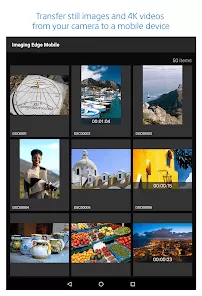
  • Wireless photo and video transfer directly to smartphones or tablets.
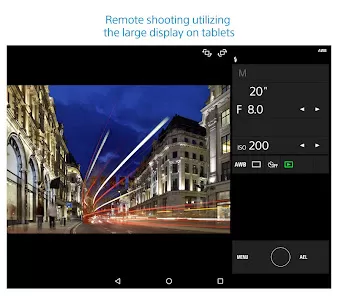
  • Remote camera control with real-time preview and shutter release.
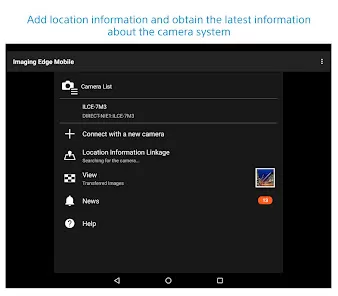
  • Automatic location tagging for georeferenced photos.
  • Support for transferring RAW and JPEG image formats.
  • Instant sharing to social media platforms or cloud storage.
  • Customizable image resizing and transfer options.
  • Automatic time synchronization between devices.
  • Firmware update notifications for supported camera models.
  • Integration with Imaging Edge Desktop for post-processing workflows.
  • Stable Wi-Fi and Bluetooth connectivity for consistent performance.

Functions

  • Connects Sony cameras to smartphones using Wi-Fi or Bluetooth.
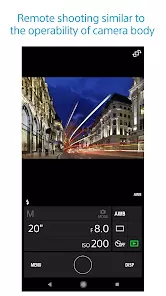
  • Allows remote operation of the camera shutter, zoom, and focus.
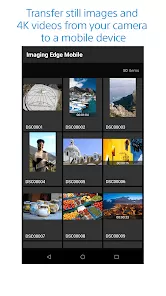
  • Transfers captured images directly to the phone gallery.
  • Embeds GPS location data in photos using smartphone coordinates.
  • Enables instant sharing of captured content on social media apps.
  • Facilitates backup of photos from camera to mobile devices.
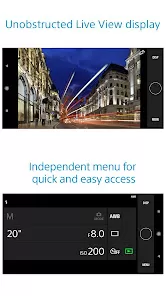
  • Displays camera settings on the smartphone screen for adjustments.
  • Links with Sony’s desktop software for image enhancement and editing.
  • Provides control over movie recording from the smartphone interface.

How to Use Imaging Edge Mobile

  • Download Imaging Edge Mobile from the Google Play Store or Apple App Store.
  • Turn on your Sony camera’s Wi-Fi or Bluetooth connection.
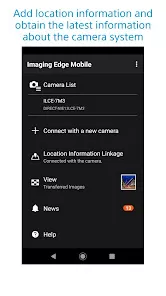
  • Open the app on your smartphone and select “Connect to Camera.”
  • Scan the QR code or manually pair the devices using the displayed SSID.
  • Once connected, use the “Remote Shooting” feature to control your camera.
  • Preview the live image feed and adjust focus, exposure, or shutter speed remotely.
  • Select and transfer images directly to your phone gallery.
  • Enable “Location Information Linkage” to geotag your photos automatically.
  • Use the app’s share function to upload photos or videos to social media.

ADVERTORIAL

User comments

1

One of the most shoddily produced, really frustrating apps I've seen so far. Not only the UI is supremely confusing but location sharing functionality is broken (and this is for one of their flagship cameras!). What could be a very simple one-click no-nonsense app to do 2 functions and to do them well is instead a tangled mess of broken features and a UI that makes people want to throw the camera at the wall. Sony, you should be ashamed of yourself!"

4

The latest version works to sync my photos wirelessly from my A6500 to my Galaxy S22. Surprisingly, I was able to figure out how to remote control the shutter using the phone interface for the first time ever. Although, this operated with serious lag that made it less than practical. My biggest gripe is that it constantly runs in the background searching for my camera even when Ive turned the app off. I only use the camera occasionally so I'll just uninstall the app between uses."

1

Apparently I left a review in 2019 that wasn't great. Guess what it's 2023 and things aren't better at all! I know it went through a couple iterations and there was some progress but now it appears it's even worse! Same as in last comment the app and supposedly being able to transfer images to your phone was a key selling point! That just doesn't work anymore and just a shame for a company like Sony"

Similar Apps
  • 登录
社交账号登录
