
Passport Parking is a mobile payment solution designed to simplify the parking experience in cities and municipalities. It allows users to pay for parking through their smartphones, eliminating the need for cash or physical meters. The app integrates with local parking systems to offer features such as remote payments, parking session extensions, and notifications when time is about to expire. By digitizing parking management, Passport Parking aims to reduce the hassle of finding change, improve convenience, and streamline enforcement for parking authorities. It is widely adopted in urban areas across the United States and other countries, promoting efficient parking operations and enhancing user experience.
Pros and Cons
Pros:
Convenient cashless payment directly from a smartphone.
Ability to extend parking sessions remotely without returning to the meter.
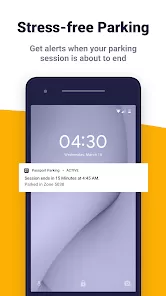
Notifications alerting users when parking time is about to expire.
Reduces the need for physical meter maintenance and coins handling.
Supports multiple payment methods including credit cards, debit cards, and mobile wallets.
Can help users locate parking zones and rates through the app.
Cons:
Requires a smartphone and internet connection, limiting accessibility for some users.
Potential issues with GPS accuracy affecting zone identification.
Some users may find the registration and setup process cumbersome.
Dependence on the app can be problematic if the service is temporarily down.
May include transaction fees or surcharges in certain locations.
Key Features
Mobile payment for parking sessions without the need for coins or physical meters.
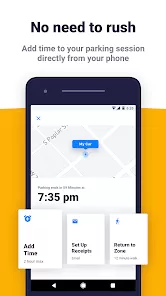
Ability to start, stop, and extend parking sessions remotely via the app.
Real-time notifications alerting users before parking expires.
Integration with local parking systems for seamless enforcement.
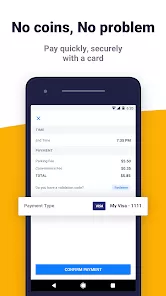
Multiple payment options including credit/debit cards and digital wallets.
Support for locating parking zones, checking rates, and viewing transaction history.
Secure and encrypted payment processing for user data protection.
Available on both iOS and Android devices.
Functions
Enables users to pay for parking using their smartphones instead of cash.
Allows extension of parking time remotely to avoid fines or penalties.
Sends timely reminders to prevent expired parking sessions.
Offers a convenient way for parking authorities to manage payments and enforcement.
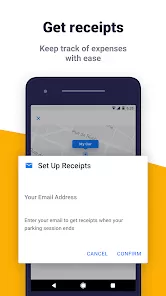
Provides users with transaction history and receipts for their parking payments.
Helps drivers find appropriate parking zones with accurate rate information.
Supports multiple locations, facilitating parking across various cities or districts.
How to Use
Download the Passport Parking app from the Apple App Store or Google Play Store.
Create an account by registering with your email, phone number, and payment details.
Locate your parking zone number on the meter or signage at your parking spot.
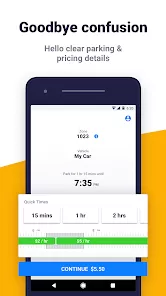
Open the app and enter the zone number, then select the desired parking duration.
Confirm and complete the payment using your preferred payment method.
Receive confirmation and a timer indicating when your parking will expire.
If needed, use the app to extend your parking session remotely before time runs out.
Check your parking history and receipts within the app for record-keeping.
Ensure your phone has an active internet connection during the process.



 0
0