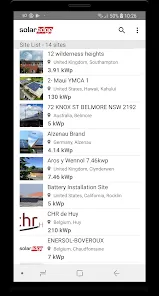
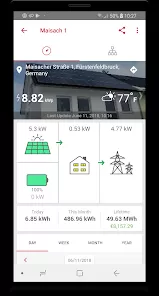
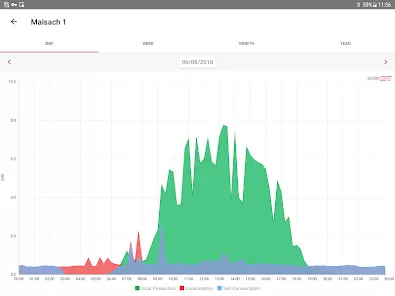
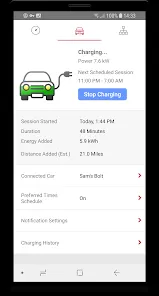
SolarEdge Monitoring is an advanced cloud-based system designed to provide real-time monitoring, analysis, and optimization for solar energy systems. This platform is part of SolarEdge’s suite of solutions for solar energy users, offering detailed insights into the performance of solar panels, inverters, and other components of a solar power setup. By connecting the solar system to the internet, SolarEdge Monitoring enables users to track energy production, identify potential issues, and ensure that their system is performing at optimal levels. The platform is accessible via a web portal or mobile app, making it easy for homeowners, businesses, and installers to access data and make informed decisions about their solar investments.
Pros and Cons
Pros:
Real-time monitoring: SolarEdge Monitoring provides users with up-to-the-minute data on solar panel performance, including energy production and system efficiency.
Remote troubleshooting: The system allows users to remotely identify and address issues, reducing downtime and the need for costly service visits.
Comprehensive analytics: Users can access detailed reports on energy generation, consumption, and environmental impact, allowing for better decision-making.
Optimized performance: With features like module-level monitoring, users can ensure each panel is performing optimally, maximizing overall system output.
Scalable: SolarEdge Monitoring supports both residential and commercial systems, making it suitable for a wide range of users and applications.
Mobile accessibility: The system is available through a mobile app, providing users with access to real-time data and insights on-the-go.
Energy savings: By tracking performance and addressing issues quickly, users can ensure their solar system is as efficient as possible, maximizing energy savings.
Cons:
Dependence on internet connectivity: Since SolarEdge Monitoring relies on cloud-based technology, a stable internet connection is essential for accessing data and troubleshooting remotely.
Initial setup: Installing the monitoring system and connecting it to the solar setup can be complex for users who are not familiar with solar technology.
Subscription costs: While the basic monitoring features are included with SolarEdge systems, advanced features may require a paid subscription or additional investment.
Device compatibility: Some older or third-party solar equipment may not be fully compatible with SolarEdge Monitoring, requiring users to upgrade or replace components.
Requires user knowledge: To fully benefit from the system's insights, users need a basic understanding of solar energy systems and their performance metrics.
Key Features
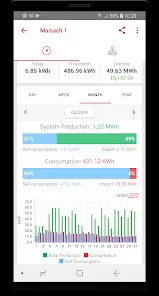
Real-time monitoring: Track energy production, system health, and performance at any time from a mobile app or web portal.
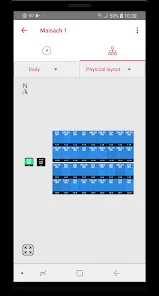
Module-level monitoring: Analyze the performance of individual solar panels to detect and address issues such as underperformance or faults.
Alerts and notifications: Receive alerts and notifications when system performance deviates from expected levels, helping to address issues before they become significant problems.
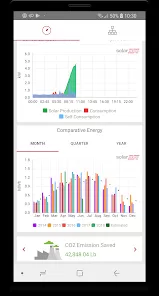
Performance reports: Access detailed reports on energy production, consumption, and savings over time, including environmental impact data such as CO2 reduction.
Energy consumption tracking: Track how much energy you’re using in real time and how much is being supplied by your solar panels.
Optimized energy output: The system automatically adjusts for shading, dirt, and other factors, ensuring maximum energy production and efficiency from each panel.
System health diagnostics: Check the health of your system and receive recommendations for repairs or maintenance to maintain optimal performance.
Mobile app accessibility: The SolarEdge Monitoring app allows users to monitor their system from anywhere, providing convenience and control at your fingertips.
Functions
Energy Production Monitoring: Monitor the total energy production of your solar system in real time to ensure it's performing at peak efficiency.
Performance Comparison: Compare current performance against historical data to identify trends and detect issues early.
System Diagnostics: Perform diagnostics to troubleshoot any system malfunctions or inefficiencies, ensuring long-term performance and savings.
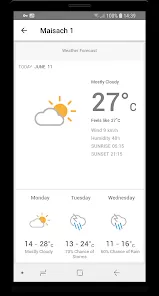
Shading and Environmental Impact Tracking: Account for environmental factors such as shading or weather conditions that may affect solar output.
Alert Notifications: Get instant alerts for any significant issues, including system faults, underperformance, or maintenance needs.
SolarEdge Home Integration: Integrate with SolarEdge Home, a smart energy management solution that optimizes energy use across your entire home, from solar to batteries and electric vehicles.
Energy Savings Calculation: View estimated savings and environmental impact data, helping you assess the financial benefits of your solar system over time.
How to Use
Step 1: Install the System: Ensure that your SolarEdge monitoring system is correctly installed, either through professional installation or by following the setup instructions provided by SolarEdge.
Step 2: Connect to the Network: Connect your SolarEdge monitoring device to your home Wi-Fi or Ethernet network for real-time data tracking and cloud synchronization.
Step 3: Download the Mobile App: Download the SolarEdge mobile app from the App Store or Google Play Store to access your monitoring data on the go.
Step 4: Create an Account: Sign up for a SolarEdge account on the mobile app or web portal to link your monitoring system to your personal account.
Step 5: Access the Dashboard: Log in to your account and access the main dashboard, which provides real-time insights into your system’s performance, energy production, and other metrics.
Step 6: Set Up Alerts: Configure alerts and notifications to be sent to your phone or email for system faults or performance deviations.
Step 7: Analyze Reports: Regularly check the performance reports and analytics provided by SolarEdge to track energy savings, efficiency, and environmental impact over time.
Step 8: Perform System Maintenance: Use the monitoring data to perform any necessary maintenance or troubleshooting as recommended by the system to ensure optimal performance.



 0
0