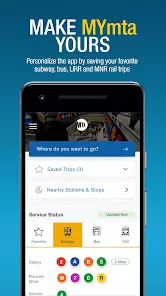
The Official MTA App is a comprehensive mobile platform developed to help riders navigate New York City’s extensive transit system with clarity and confidence. It centralizes real-time updates for subways, buses, commuter rail lines, and accessibility services, allowing travelers to plan their trips more efficiently. The app provides live arrival times, service alerts, route alternatives, and station information to support both daily commuters and occasional visitors. By integrating multiple transit modes in one interface, it reduces confusion and helps riders adapt quickly to delays or service changes. Designed for ease of use, The Official MTA App offers intuitive tools that make urban travel more predictable, enhancing the overall experience of moving through one of the world’s busiest transportation networks.
Key Features
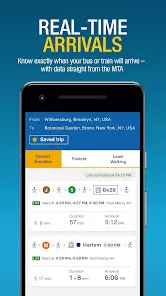
Real-time subway and bus arrival estimates that help riders time their trips accurately.
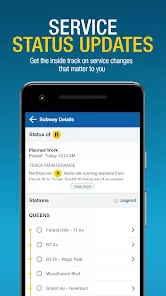
Live service alerts for delays, planned work, reroutes, and emergency disruptions across all MTA lines.
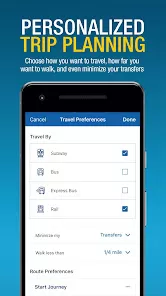
Integrated trip planner that suggests the fastest or most reliable multimodal routes.
Interactive maps featuring station details, transfer options, and walking connections.
Commuter rail support for Metro-North and Long Island Rail Road with schedule and platform information.
Accessibility tools showing stations with elevators, escalators, and step-free access routes.
Favorites system that lets users save preferred stations or routes for quick reference.
Push notifications that deliver urgent service changes at crucial moments.
Offline map access for planning routes even without a stable internet connection.
Location-based features that show nearby stops, entrances, and bus routes.
Pros & Cons
Pros: Offers highly accurate real-time information to reduce uncertainty during commutes.
Streamlines navigation by consolidating subway, bus, and rail services into one interface.
Enhances accessibility by clearly marking stations with mobility-support features.
Useful for both tourists and locals thanks to intuitive design and multilingual support.
Notifications ensure riders remain informed about sudden disruptions or schedule adjustments.
Cons: Performance may vary depending on network availability in underground areas.
Occasional data delays can occur during heavy traffic or unexpected service issues.
Some features may require location permissions that privacy-conscious users hesitate to grant.
Offline capabilities are limited compared to full-service planning while connected.
Functions
Provides real-time tracking of trains and buses to help riders anticipate arrivals and avoid long waits.
Delivers detailed station information including entrances, exits, transfers, and accessibility features.
Generates step-by-step route planning instructions combining walking, subway, bus, and rail connections.
Displays system-wide service advisories so riders can adjust travel plans in response to disruptions.
Enables users to save favorite routes and stations for faster access during busy commuting hours.
Supports navigation for Metro-North and LIRR with accurate timetable and platform listings.
Offers push alerts tailored to chosen routes, ensuring timely notice of updates affecting regular travel.
Shows bus crowding levels where available, helping riders choose less congested options.
How to Use
Click the button "Check All Versions" below to download and install it.
Open the app and allow location permissions to receive accurate nearby station and stop information.
Use the home screen to check real-time arrivals for subways, buses, or rail lines around you.
Access the trip planner to enter your destination and review suggested routes, travel times, and alternatives.
Tap on a station or stop to view maps, service alerts, accessibility details, and transfer points.
Enable push notifications to stay updated on disruptions affecting your saved routes or preferred lines.
Save daily commute stations as favorites for faster access whenever you open the app.
Use offline maps if connectivity is limited, especially in deep subway stations or tunnels.
Customize settings to adjust alert frequency, language options, and route preferences.
Check service advisories before leaving home to avoid unexpected delays or platform changes.
Explore rail schedules for Metro-North or LIRR when planning longer-distance commutes.


0