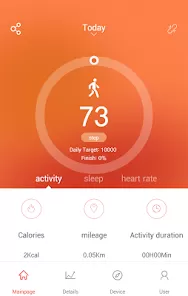
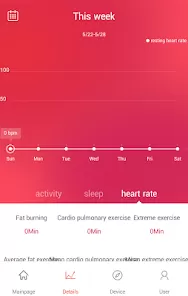
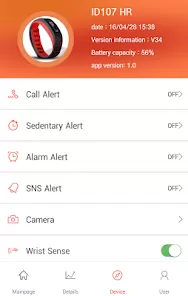
VeryFitPro is a companion mobile app designed to work with various fitness trackers and smartwatches, primarily those from lesser-known yet affordable brands. It helps users monitor health and fitness metrics such as steps taken, calories burned, heart rate, sleep patterns, and more. Available on both Android and iOS, the app syncs data from your wearable device and presents it in easy-to-read charts and graphs. VeryFitPro is ideal for users looking for basic health tracking without the high cost of premium brandable wears. Though it lacks the advanced features found in leading apps like Fitbit or Garmin Connect, it delivers dependable performance for everyday activity monitoring and helps users develop healthy habits with real-time data and feedback.
Pros & Cons of VeryFitPro
Pros
Budget-Friendly Integration: Works well with many low-cost fitness bands and smartwatches, making health tracking accessible for users on a budget.
User-Friendly Interface: The app is simple to set up and navigate, even for those who are not tech-savvy.
Real-Time Sync: Provides real-time synchronization of health data from your wearable to the app.
Supports Multiple Metrics: Tracks steps, distance, calories burned, sleep quality, heart rate, and more.
Customizable Notifications: Allows notifications for calls, messages, alarms, and sedentary alerts.
Battery Monitoring: Displays the battery life of connected devices directly within the app.
Regular Updates: Receives occasional updates to improve stability and support for newer devices.
Cons
Limited Third-Party Integration: Does not support syncing with popular platforms like Google Fit, Apple Health, or MyFitnessPal.
Basic Analytics: Offers limited in-depth analysis compared to premium health-tracking apps.
Inconsistent Data Accuracy: Some users report inaccuracies in step counting or sleep tracking.
Language Barriers: Some translations in the app can be awkward or confusing for English-speaking users.
Minimal Customization: Few options for personalizing the app's look or dashboard layout.
Notifications May Lag: Occasionally, alerts or call notifications from the phone to the wearable device may be delayed.
Key Features of VeryFitPro
Activity Tracking: Tracks daily step count, distance traveled, and calories burned to help you meet your fitness goals.
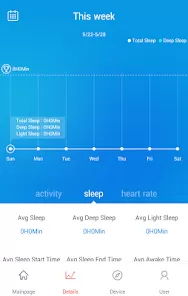
Sleep Monitoring: Provides insights into sleep duration and quality, broken down into deep and light sleep segments.
Heart Rate Monitoring: Continuously or periodically monitors heart rate during rest and workouts.
Smart Notifications: Sends notifications for calls, texts, emails, and select app alerts directly to your wearable device.
Alarm and Sedentary Reminders: Set silent alarms or inactivity reminders to prompt movement and reduce sedentary behavior.
Goal Setting: Customize daily fitness goals like step targets and sleep duration to align with personal health objectives.
Weather Information: Some devices supported by the app display current weather updates via the app sync.
Multi-Sport Modes: Supports tracking of various exercises including running, walking, cycling, and more, depending on your device model.
Find My Device: Locate your wearable using the app if it’s within Bluetooth range.
Functions of VeryFitPro
Data Synchronization: Automatically syncs fitness and health data from your wearable to your smartphone for daily tracking.
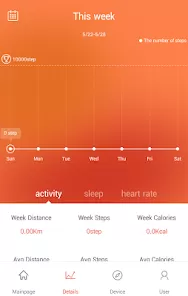
Health Data Visualization: Presents activity data in charts and graphs, making it easy to spot patterns and trends.
Real-Time Monitoring: Enables real-time tracking of certain metrics like heart rate and step count during workouts.
Daily and Weekly Reports: View progress over time with daily, weekly, or monthly summaries.
Push Notifications: Relays notifications from your phone to your wearable device so you don’t miss important messages.
Sleep Analysis: Breaks down sleep periods and assesses your overall sleep health based on nighttime movement and duration.
Firmware Updates: Allows for firmware upgrades of supported devices directly through the app to ensure compatibility and feature enhancements.
Goal Tracking: Measures progress toward custom fitness and health goals, providing visual indicators of achievement.
How to Use VeryFitPro
Step 1 – Download the App: Search for "VeryFitPro" in the Apple App Store or Google Play Store, click "All Versions" and download it to your smartphone.
Step 2 – Pair Your Device: Turn on Bluetooth, open the app, and follow the instructions to pair your compatible fitness tracker or smartwatch.
Step 3 – Set Up Your Profile: Enter personal data such as height, weight, age, and activity level to get personalized metrics.
Step 4 – Grant Permissions: Allow the app to access notifications, GPS, and other necessary permissions for full functionality.
Step 5 – Explore the Dashboard: View your step count, heart rate, sleep data, and other tracked metrics from the home screen.
Step 6 – Set Fitness Goals: Navigate to the goal-setting section to define your daily targets for steps, sleep, and other activities.
Step 7 – Enable Notifications: Choose which phone alerts (calls, SMS, apps) you want pushed to your device from the notifications settings.
Step 8 – Track Your Progress: Check daily and weekly charts to see how you're performing over time and make adjustments as needed.
Step 9 – Use Sport Modes: Activate sport-specific tracking for walking, running, or cycling by selecting the mode on your wearable or via the app.
Step 10 – Sync Regularly: Open the app daily to ensure your data is synced and your wearable stays updated with accurate information.


 0
0