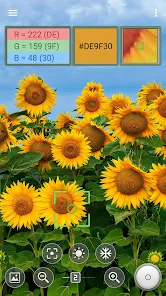
Color Picker is a practical utility application designed to help users identify, capture, and manage colors directly from their mobile devices. It allows designers, developers, artists, and everyday users to extract precise color values from images, photos, or real-world objects using the device camera. The app simplifies the process of working with digital colors by providing instant access to formats such as HEX, RGB, and HSL. With its straightforward interface, users can quickly select, save, and reuse colors for creative or technical projects. Whether used for graphic design, branding reference, UI development, or simple color matching, Color Picker turns a smartphone into a convenient color analysis tool that improves accuracy and workflow efficiency.
Key Features
Captures colors directly from photos stored on the device.
Uses the camera to pick colors from real-world objects.
Displays color values in HEX, RGB, and HSL formats.
Allows saving favorite colors for later reference.
Simple interface focused on fast color selection.
Zoom function improves precision when selecting small areas.
Supports copying color codes with a single tap.
Works offline once installed.
Lightweight design ensures smooth performance.
Pros & Cons
Pros:
Highly useful for designers and developers.
Quick access to accurate color values.
Easy to learn and navigate.
Does not require an internet connection.
Cons:
Limited functionality beyond color picking.
Accuracy depends on camera quality and lighting.
No built-in palette generation tools.
Functions
Extracts color values from images and camera input.
Converts selected colors into multiple formats.
Saves and organizes frequently used colors.
Copies color codes for external use.
Zooms into images for precise selection.
How to Use
Click the button ""Check All Versions"" below to download and install it.
Open the app and choose camera or image mode.
Select the area of the image to pick a color.
View the generated color codes instantly.
Save or copy the color for later use.


 0
0