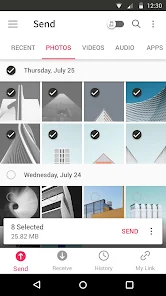
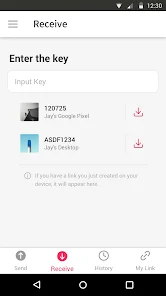
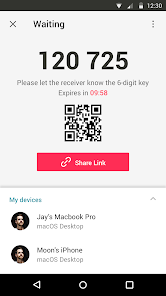
Send Anywhere (File Transfer) is a cross-platform application designed to allow users to transfer files quickly and securely between devices. It supports sending documents, photos, videos, and other data without requiring cloud storage, ensuring privacy and speed. The app generates unique six-digit keys or links to authorize transfers, enabling one-time or multiple device sharing. With compatibility across mobile, desktop, and web platforms, Send Anywhere simplifies file sharing without complex setups. Its intuitive interface and real-time transfer capabilities make it an efficient tool for individuals and teams needing a reliable, secure, and versatile solution for sharing large files across locations.
Key Features
Cross-platform file transfer between devices.
Supports photos, videos, documents, and other file types.
Generates unique 6-digit keys for secure transfers.
Real-time file transfer with fast speeds.
No cloud storage required for direct sharing.
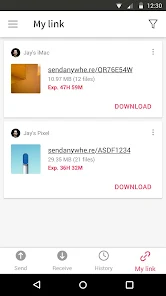
Link-based sharing for remote recipients.
Simple drag-and-drop interface.
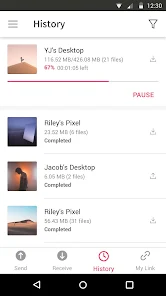
History of recent transfers for reference.
Supports mobile, desktop, and web platforms.
Optional encryption for enhanced security.
Pros & Cons
Pros:
Fast and efficient file transfers.
Highly secure with key-based sharing.
No sign-up required for basic transfers.
Supports large file sizes.
Cross-device and platform compatibility.
Cons:
Transfers require both devices to be online.
Free version has limitations on file size for certain platforms.
Some features require a premium subscription.
Functions
Sends and receives files securely between devices.
Generates unique keys or links for authorization.
Tracks recent transfer history.
Supports multiple file types and large sizes.
Enables link-based sharing for remote users.
Encrypts transfers to protect data.
How to Use
Click the button ""Check All Versions"" below to download and install it.
Open the app on both sending and receiving devices.
Select files to transfer and generate a 6-digit key or link.
Enter the key on the receiving device or share the link.
Confirm and start the file transfer.
Monitor progress until the transfer completes.
Access received files immediately on the destination device.


 0
0