Socratic by Google is an innovative educational app designed to help students with homework and study across a variety of subjects. It uses artificial intelligence to provide step-by-step explanations, visual aids, and relevant resources by simply scanning or typing in questions. The app supports topics ranging from math, science, history, to literature and more, making it a versatile tool for learners at different levels. Socratic’s AI-powered engine breaks down complex concepts into understandable answers, assisting students to learn effectively outside the classroom. The app is free, user-friendly, and integrated with Google’s search capabilities, offering a seamless learning experience that fosters independent study and problem-solving skills.
Pros and Cons of Socratic by Google
Pros:
Free and accessible on both Android and iOS platforms.
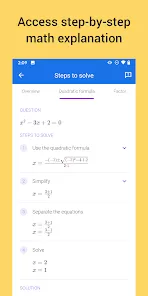
Uses AI to provide detailed explanations and step-by-step solutions.
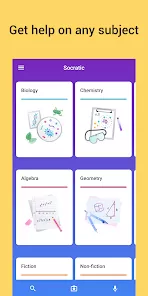
Supports a wide range of subjects including math, science, literature, and social studies.
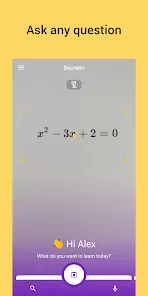
Allows question input via text or photo scanning, making it versatile.
Integrates visual aids and videos to enhance understanding.
Helps students develop critical thinking rather than just giving answers.
Clean and easy-to-navigate user interface.
Cons:
Sometimes struggles with handwritten or unclear questions.
Explanations can occasionally be too simplistic for advanced learners.
Relies on internet connectivity to function effectively.
Limited support for very specialized or niche academic topics.
Does not replace in-depth tutoring or classroom instruction.
Key Features of Socratic by Google
AI-powered question recognition via text input or photo scanning.
Step-by-step explanations for complex problems, especially in math.
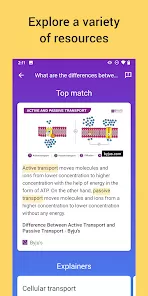
Visual aids including diagrams, charts, and videos linked to relevant topics.
Support for multiple subjects like algebra, biology, history, and grammar.
Instant access to trusted online educational resources.
Personalized learning recommendations based on user queries.
Voice input functionality for hands-free question asking.
Bookmark and save questions for easy review and study later.
Integration with Google search to enhance research capabilities.
User-friendly interface designed for students of all ages.
Functions of Socratic by Google
Scan homework questions using the device camera for instant analysis.
Enter questions manually via text for quick answers and explanations.
Access detailed step-by-step solutions to aid understanding and learning.
View supplementary educational videos and tutorials related to the question.
Browse through curated resources and articles to deepen subject knowledge.
Use voice commands to ask questions hands-free, enhancing accessibility.
Save and organize questions and answers for future reference and study.
Receive tailored explanations that match the user’s education level.
Share solutions and explanations easily with classmates or tutors.
Track learning progress and identify areas needing further practice.
How to Use Socratic by Google
Download and Install: Get the Socratic app from the Google Play Store or Apple App Store.
Open the App: Launch the app and grant necessary permissions like camera access.
Ask a Question: Type your question or use the camera to scan printed or handwritten homework.
Review Results: View AI-generated explanations, visual aids, and linked educational content.
Use Voice Input: Tap the microphone icon to ask questions without typing.
Bookmark Questions: Save difficult or important questions for later review.
Explore Subjects: Navigate through different subjects to find resources or ask more questions.
Adjust Settings: Customize notifications, language preferences, or learning level.
Share and Collaborate: Send solutions or explanations to peers or teachers for assistance.
Regularly Practice: Use Socratic consistently to improve learning and problem-solving skills.




 0
0