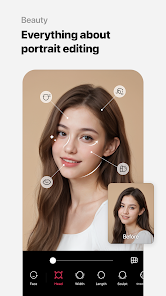
Presets & Filters - Koloro is a mobile application designed for photographers and social media enthusiasts who want to enhance their photos with professional-grade filters and editing presets. The app provides a wide range of customizable effects, including color grading, exposure adjustments, and stylistic overlays. Users can apply pre-built presets or create their own, allowing consistent editing across multiple photos. Koloro integrates seamlessly with popular photo-sharing platforms, making it easy to produce visually striking content. The app’s intuitive interface, tutorials, and regular updates ensure that both beginners and experienced editors can quickly enhance images and maintain a consistent visual aesthetic.
Key Features
Extensive library of photo filters and presets.
Customizable color grading and exposure controls.
Create, save, and reuse custom presets.
Integration with social media platforms for sharing.
Regularly updated filter packs and templates.
Intuitive editing tools for quick adjustments.
Before-and-after preview to compare edits.
Support for high-resolution images.
Guided tutorials for new users.
Lightweight performance optimized for mobile devices.
Pros & Cons
Pros:
Professional-grade filters for high-quality results.
Custom presets allow consistent visual style.
Easy integration with social media platforms.
User-friendly interface for quick edits.
Regular updates add new creative options.
Cons:
Some advanced presets may require premium subscription.
High-resolution editing may slow down older devices.
Limited offline functionality for certain resources.
Learning curve for beginners using advanced tools.
Functions
Apply pre-built presets to enhance photos instantly.
Adjust exposure, brightness, contrast, and color balance.
Create and save custom presets for future use.
Share edited images directly to social media.
Compare before-and-after edits to evaluate changes.
Use tutorials and guides to explore advanced features.
Manage and organize photo projects within the app.
Maintain high-quality visuals with consistent edits.
How to Use
Click the button ""Check All Versions"" below to download and install it.
Open Koloro and grant access to your photo library.
Select a photo and choose a preset or filter.
Adjust parameters such as brightness, contrast, and color.
Save edits or create a custom preset for reuse.
Share enhanced images directly to social media platforms.
Explore tutorials to master advanced editing techniques.


 0
0